This is the tiny developer documentation for Hono.
# Start of Hono documentation
# Hono
Hono —— _**在日语中意为火焰🔥**_ —— 是一个基于 Web 标准构建的小巧、简单且极速的 Web 应用框架。
它能够运行在任意 JavaScript 运行时:Cloudflare Workers、Fastly Compute、Deno、Bun、Vercel、Netlify、AWS Lambda、Lambda@Edge,以及 Node.js。
快,而且不止于快。
```ts twoslash
import { Hono } from 'hono'
const app = new Hono()
app.get('/', (c) => c.text('Hono!'))
export default app
```
## 快速上手
只需运行下列命令之一:
::: code-group
```sh [npm]
npm create hono@latest
```
```sh [yarn]
yarn create hono
```
```sh [pnpm]
pnpm create hono@latest
```
```sh [bun]
bun create hono@latest
```
```sh [deno]
deno init --npm hono@latest
```
:::
## 核心特性
- **极速性能** 🚀 —— `RegExpRouter` 路由器拥有极致性能,没有线性循环,真正的快。
- **轻量体积** 🪶 —— `hono/tiny` 预设压缩后小于 14kB。Hono 没有任何依赖,只使用 Web 标准。
- **多运行时** 🌍 —— 兼容 Cloudflare Workers、Fastly Compute、Deno、Bun、AWS Lambda 与 Node.js,同一份代码跑遍所有平台。
- **电池全配** 🔋 —— 内置中间件、可自定义中间件、第三方中间件与助手函数,开箱即用。
- **愉悦的开发体验** 😃 —— API 简洁清晰,对 TypeScript 提供一流支持,如今还拥抱了完备的类型系统。
## 适用场景
Hono 是一个类似 Express 的纯后端 Web 应用框架,没有前端层。
它可以在 CDN 边缘运行,与中间件组合即可搭建更大的应用。
以下是几个典型案例:
- 构建 Web API
- 作为后端服务器的代理
- CDN 边缘的入口层
- 边缘计算应用
- 库或框架的基础服务器
- 全栈应用
## 谁在使用 Hono?
| 项目 | 平台 | 用途 |
| --------------------------------------------------------------------------------- | ------------------ | -------------------------------------------------------------------------------------------- |
| [cdnjs](https://cdnjs.com) | Cloudflare Workers | 免费开源的 CDN 服务,_Hono 被用于提供 API 服务_。 |
| [Cloudflare D1](https://www.cloudflare.com/developer-platform/d1/) | Cloudflare Workers | 无服务器 SQL 数据库,_Hono 被用于内部 API 服务_。 |
| [Cloudflare Workers KV](https://www.cloudflare.com/developer-platform/workers-kv/) | Cloudflare Workers | 无服务器键值数据库,_Hono 被用于内部 API 服务_。 |
| [BaseAI](https://baseai.dev) | 本地 AI 服务器 | 带有记忆功能的无服务器 AI Agent 流水线开源框架,_使用 Hono 搭建 API 服务器_。 |
| [Unkey](https://unkey.dev) | Cloudflare Workers | 开源的 API 鉴权与授权平台,_Hono 被用于 API 服务器_。 |
| [OpenStatus](https://openstatus.dev) | Bun | 开源的网站与 API 监控平台,_Hono 被用于 API 服务器_。 |
| [Deno Benchmarks](https://deno.com/benchmarks) | Deno | 基于 V8 的安全 TypeScript 运行时,_Hono 用于基准测试_。 |
| [Clerk](https://clerk.com) | Cloudflare Workers | 开源的用户管理平台,_Hono 被用于 API 服务器_。 |
还有以下团队也在生产环境中使用 Hono:
- [Drivly](https://driv.ly/) - Cloudflare Workers
- [repeat.dev](https://repeat.dev/) - Cloudflare Workers
想了解更多?请访问 [Who is using Hono in production?](https://github.com/orgs/honojs/discussions/1510)。
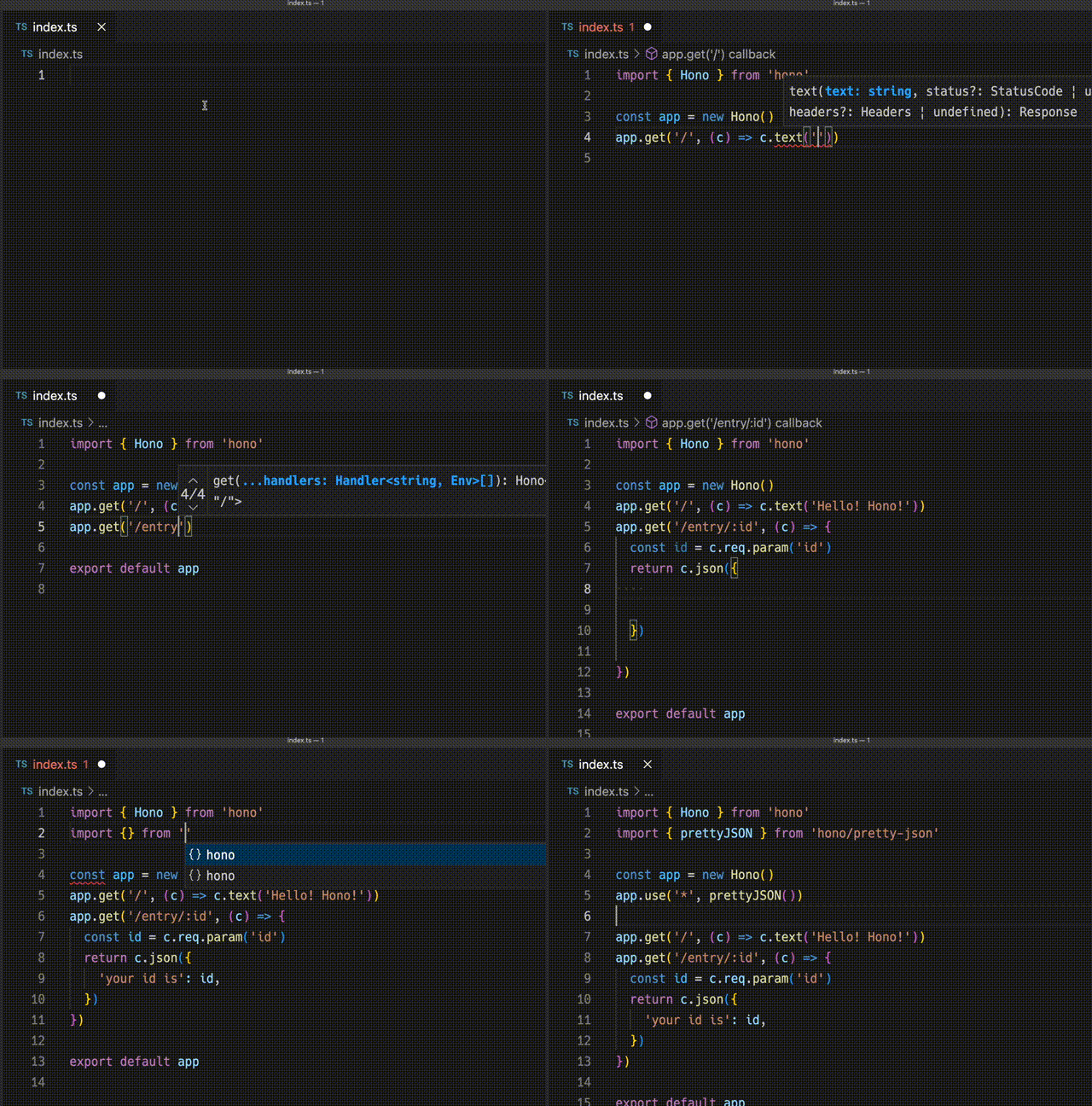
## 一分钟体验 Hono
以下演示展示了如何使用 Hono 在 Cloudflare Workers 上创建应用。
## 极速表现
**在 Cloudflare Workers 的各类路由器中,Hono 是最快的。**
```
Hono x 402,820 ops/sec ±4.78% (80 runs sampled)
itty-router x 212,598 ops/sec ±3.11% (87 runs sampled)
sunder x 297,036 ops/sec ±4.76% (77 runs sampled)
worktop x 197,345 ops/sec ±2.40% (88 runs sampled)
Fastest is Hono
✨ Done in 28.06s.
```
查看 [更多基准测试](/docs/concepts/benchmarks)。
## 轻量体积
**Hono 非常小。**在使用 `hono/tiny` 预设并压缩后,体积 **低于 14KB**。
拥有众多中间件和适配器,但只会在使用时才打包。作为对比,Express 的体积为 572KB。
```
$ npx wrangler dev --minify ./src/index.ts
⛅️ wrangler 2.20.0
--------------------
⬣ Listening at http://0.0.0.0:8787
- http://127.0.0.1:8787
- http://192.168.128.165:8787
Total Upload: 11.47 KiB / gzip: 4.34 KiB
```
## 多款路由器
**Hono 提供多种路由器实现。**
**RegExpRouter** 是 JavaScript 世界中最快的路由器。它在派发前先构建一个巨大的正则表达式,用以匹配路由。配合 **SmartRouter**,即可支持所有路由模式。
**LinearRouter** 能够极快地注册路由,适用于每次请求都会初始化应用的运行时。**PatternRouter** 则以简单的方式添加并匹配路由模式,让体积更小。
查看 [更多关于路由的信息](/docs/concepts/routers)。
## Web 标准
得益于 **Web 标准**,Hono 可以运行在众多平台上。
- Cloudflare Workers
- Cloudflare Pages
- Fastly Compute
- Deno
- Bun
- Vercel
- AWS Lambda
- Lambda@Edge
- 以及更多
通过使用 [Node.js 适配器](https://github.com/honojs/node-server),Hono 也能在 Node.js 上运行。
查看 [更多关于 Web 标准的信息](/docs/concepts/web-standard)。
## 中间件与助手
**Hono 拥有大量中间件与助手函数**,真正实现“写得更少,做得更多”。
开箱即用的中间件与助手包括:
- [Basic Authentication](/docs/middleware/builtin/basic-auth)
- [Bearer Authentication](/docs/middleware/builtin/bearer-auth)
- [Body Limit](/docs/middleware/builtin/body-limit)
- [Cache](/docs/middleware/builtin/cache)
- [Compress](/docs/middleware/builtin/compress)
- [Context Storage](/docs/middleware/builtin/context-storage)
- [Cookie](/docs/helpers/cookie)
- [CORS](/docs/middleware/builtin/cors)
- [ETag](/docs/middleware/builtin/etag)
- [html](/docs/helpers/html)
- [JSX](/docs/guides/jsx)
- [JWT Authentication](/docs/middleware/builtin/jwt)
- [Logger](/docs/middleware/builtin/logger)
- [Language](/docs/middleware/builtin/language)
- [Pretty JSON](/docs/middleware/builtin/pretty-json)
- [Secure Headers](/docs/middleware/builtin/secure-headers)
- [SSG](/docs/helpers/ssg)
- [Streaming](/docs/helpers/streaming)
- [GraphQL Server](https://github.com/honojs/middleware/tree/main/packages/graphql-server)
- [Firebase Authentication](https://github.com/honojs/middleware/tree/main/packages/firebase-auth)
- [Sentry](https://github.com/honojs/middleware/tree/main/packages/sentry)
- 以及更多!
例如,在 Hono 中仅需几行代码就能加入 ETag 与请求日志:
```ts
import { Hono } from 'hono'
import { etag } from 'hono/etag'
import { logger } from 'hono/logger'
const app = new Hono()
app.use(etag(), logger())
```
查看 [更多关于中间件的信息](/docs/concepts/middleware)。
## 开发者体验
Hono 带来令人愉悦的“**开发者体验**”。
得益于 `Context` 对象,可以轻松获取 Request/Response。
此外,Hono 采用 TypeScript 编写,自带“**类型**”。
例如,路径参数会被推断为字面量类型。
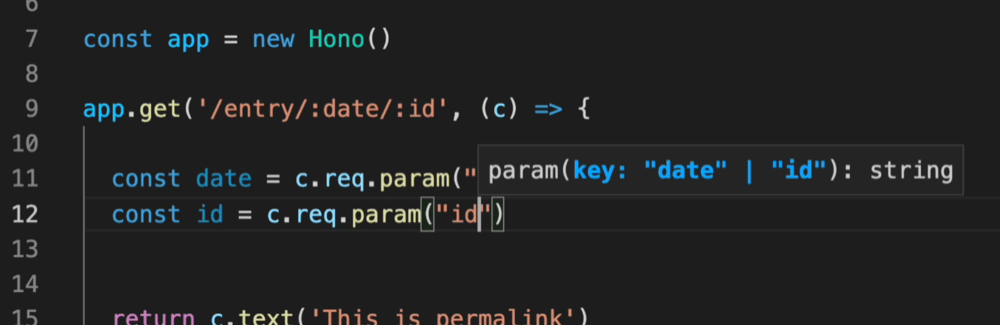
借助 Validator 与 Hono Client `hc`,可以启用 RPC 模式。
在该模式下,你可以继续使用自己喜爱的校验器(如 Zod),轻松在服务端与客户端之间共享 API 规范,从而构建类型安全的应用。
查看 [Hono Stacks](/docs/concepts/stacks)。
# 最佳实践
Hono 十分灵活,你可以按照自己的偏好编写应用。
不过,仍然有一些更值得遵循的最佳实践。
## 尽量不要创建“控制器”
能不写“Ruby on Rails 风格的控制器”时,就别写。
```ts
// 🙁
// 类似 RoR 的控制器
const booksList = (c: Context) => {
return c.json('list books')
}
app.get('/books', booksList)
```
问题出在类型上。例如,如果不写复杂的泛型,控制器内部无法推断路径参数。
```ts
// 🙁
// 类似 RoR 的控制器
const bookPermalink = (c: Context) => {
const id = c.req.param('id') // 无法推断路径参数
return c.json(`get ${id}`)
}
```
因此你完全没必要写 RoR 风格的控制器,直接在路径定义后编写处理函数即可。
```ts
// 😃
app.get('/books/:id', (c) => {
const id = c.req.param('id') // 可以正确推断路径参数
return c.json(`get ${id}`)
})
```
## 使用模式验证请求
如果需要验证请求,请使用模式验证器,而不要手写验证逻辑。
```ts
import { z } from 'zod'
import { zValidator } from '@hono/zod-validator'
app.post(
'/auth',
zValidator(
'json',
z.object({
email: z.string().email(),
password: z.string().min(8),
})
),
async (c) => {
const { email, password } = c.req.valid('json')
return c.json({ email, password })
}
)
```
## 在调用 `app.get()` 之前定义配置
这是来自 JavaScript 模块的最佳实践:
在调用函数之前先定义配置对象。
```ts
const route = {
method: 'GET',
path: '/',
}
app.get(route, (c) => c.text('Hello'))
```
## 不要为了分组而重复使用 `app.route`
只有在需要为同一路径提供多个 HTTP 方法时,才应该使用 `app.route`。
如果只是想划分路由分组,就会显得多此一举。
```ts
const app = new Hono()
const books = app.route('/books')
books.get('/', (c) => c.json(['Hello']))
books.get('/:id', (c) => c.json({ id: c.req.param('id') }))
```
在这种情况下就显得冗余了。直接写成下面这样能得到相同的效果。
```ts
app.get('/books', (c) => c.json(['Hello']))
app.get('/books/:id', (c) => c.json({ id: c.req.param('id') }))
```
## 更倾向使用 `app.on` 而不是 `app.xxx`
Hono 提供了 `app.on`,可以为同一路径定义多个 HTTP 方法。建议使用 `app.on`,而不是 `app.xxx`。
```ts
app.on(['GET', 'POST'], '/books', (c) => {
return c.json(['Hello'])
})
```
## 使用 `c.req.param()` 而非 `c.req.param['id']`
请使用函数形式的 `c.req.param()`,而不是访问器 `c.req.param['id']`,以避免触发 getter。
```ts
app.get('/books/:id', (c) => {
const id = c.req.param('id')
return c.json({ id })
})
```
## 用模板字符串拼接响应
拼接响应文本时,请使用模板字符串,而不是字符串相加。
```ts
app.get('/hello/:name', (c) => {
const { name } = c.req.param()
return c.text(`Hello ${name}!`)
})
```
## 日志
使用 `console.log` 和 `console.error` 输出日志信息。
```ts
app.get('/hello', async (c) => {
const start = Date.now()
const res = await c.req.parseBody()
const end = Date.now()
console.log(`[${c.req.method}] ${c.req.path} - ${end - start}ms`)
return c.json(res)
})
```
## 用 `c.var` 复用逻辑
如果有重复使用的逻辑,可以通过 `c.set` 和 `c.var` 进行复用。
```ts
app.use('*', async (c, next) => {
c.set('database', await getDatabase())
await next()
})
app.get('/users', async (c) => {
const db = c.var.database
const users = await db.users.findMany()
return c.json(users)
})
```
## 等待 Response
`Response` 只能读取一次。等待响应会消耗它。
```ts
app.get('/', async (c) => {
const res = await fetch('https://example.com')
const json = await res.json()
return c.json(json)
})
```
# Create-hono
以下是 `create-hono` 支持的命令行选项。这个项目初始化工具会在你执行 `npm create hono@latest`、`npx create-hono@latest` 或 `pnpm create hono@latest` 时运行。
> [!NOTE]
> **为什么需要这篇文档?** 安装与快速上手示例通常只展示最精简的 `npm create hono@latest my-app` 命令。其实 `create-hono` 提供了很多实用的参数,可以帮助你自动化并自定义项目创建过程(选择模板、跳过交互式提示、指定包管理器、使用本地缓存等)。
## 传递参数
使用 `npm create`(或 `npx`)时,传给初始化脚本的参数必须放在 `--` 之后。`--` 后面的所有内容都会转发给初始化器。
::: code-group
```sh [npm]
# 将参数转发给 create-hono(npm 必须使用 `--`)
npm create hono@latest my-app -- --template cloudflare-workers
```
```sh [yarn]
# "--template cloudflare-workers" 会选择 Cloudflare Workers 模板
yarn create hono my-app --template cloudflare-workers
```
```sh [pnpm]
# "--template cloudflare-workers" 会选择 Cloudflare Workers 模板
pnpm create hono@latest my-app --template cloudflare-workers
```
```sh [bun]
# "--template cloudflare-workers" 会选择 Cloudflare Workers 模板
bun create hono@latest my-app --template cloudflare-workers
```
```sh [deno]
# "--template cloudflare-workers" 会选择 Cloudflare Workers 模板
deno init --npm hono@latest my-app --template cloudflare-workers
```
:::
## 常用参数
| 参数 | 说明 | 示例 |
| :---------------------- | :------------------------------------------------------------------------------------------------ | :----------------------------- |
| `--template ` | 选择一个起始模板,并跳过交互式模板提示。模板名称可能包括 `bun`、`cloudflare-workers`、`vercel` 等 | `--template cloudflare-workers` |
| `--install` | 模板创建完毕后自动安装依赖。 | `--install` |
| `--pm ` | 指定安装依赖时使用的包管理器。常见值:`npm`、`pnpm`、`yarn`。 | `--pm pnpm` |
| `--offline` | 使用本地缓存/模板,而不是获取最新的远程模板。适合离线环境或希望固定模板版本的场景。 | `--offline` |
> [!NOTE]
> 模板列表与可用选项由 `create-hono` 项目维护。本文仅汇总了最常用的参数——完整且权威的参考请查看下方仓库链接。
## 示例流程
### 最小化、交互式
```bash
npm create hono@latest my-app
```
命令会提示你选择模板和其他选项。
### 非交互式:指定模板与包管理器
```bash
npm create hono@latest my-app -- --template vercel --pm npm --install
```
该命令会基于 `vercel` 模板创建 `my-app`,使用 `npm` 安装依赖,并跳过所有交互式提问。
### 使用离线缓存(无网络)
```bash
pnpm create hono@latest my-app --template deno --offline
```
## 故障排查与提示
- 如果某个参数似乎没有生效,请确认在使用 `npm create`/`npx` 时是否加上了 `--` 进行转发。
- 想查看最新的模板与参数列表,可以直接查阅 `create-hono` 仓库,或者本地运行初始化工具并查看其帮助信息。
## 相关链接
- `create-hono` 仓库:[create-hono](https://github.com/honojs/create-hono)
# 示例
请参阅[示例章节](/examples/)。
# 常见问题
本指南整理了关于 Hono 的常见疑问及解决方式。
## Hono 是否提供官方的 Renovate 配置?
目前 Hono 团队没有维护 [Renovate](https://github.com/renovatebot/renovate) 的官方配置。
因此,请参考以下方式使用第三方的 renovate-config。
在你的 `renovate.json` 中写入:
```json
// renovate.json
{
"$schema": "https://docs.renovatebot.com/renovate-schema.json",
"extends": [
"github>shinGangan/renovate-config-hono" // [!code ++]
]
}
```
更多详情请参阅 [renovate-config-hono](https://github.com/shinGangan/renovate-config-hono) 仓库。
# 助手
助手(Helper)可以在开发应用时提供支持。与中间件不同,它们不会作为处理函数运行,而是提供便捷的实用功能。
例如,[Cookie 助手](/docs/helpers/cookie) 的使用方式如下:
```ts
import { getCookie, setCookie } from 'hono/cookie'
const app = new Hono()
app.get('/cookie', (c) => {
const yummyCookie = getCookie(c, 'yummy_cookie')
// ...
setCookie(c, 'delicious_cookie', 'macha')
//
})
```
## 可用的助手
- [Accepts](/docs/helpers/accepts)
- [Adapter](/docs/helpers/adapter)
- [Cookie](/docs/helpers/cookie)
- [css](/docs/helpers/css)
- [Dev](/docs/helpers/dev)
- [Factory](/docs/helpers/factory)
- [html](/docs/helpers/html)
- [JWT](/docs/helpers/jwt)
- [SSG](/docs/helpers/ssg)
- [Streaming](/docs/helpers/streaming)
- [Testing](/docs/helpers/testing)
- [WebSocket](/docs/helpers/websocket)
# 客户端组件
`hono/jsx` 不仅支持服务端渲染,也支持在客户端运行。这意味着你可以在浏览器里构建交互式界面,我们把它称作客户端组件,或 `hono/jsx/dom`。
它既快又小。`hono/jsx/dom` 的计数器示例在 Brotli 压缩后只有 2.8KB,而 React 的同类示例则有 47.8KB。
本章介绍客户端组件特有的功能。
## 计数器示例
下面是一个简单的计数器示例,代码与 React 中的写法相同。
```tsx
import { useState } from 'hono/jsx'
import { render } from 'hono/jsx/dom'
function Counter() {
const [count, setCount] = useState(0)
return (
Count: {count}
)
}
function App() {
return (
)
}
const root = document.getElementById('root')
render(, root)
```
## `render()`
你可以使用 `render()` 将 JSX 组件插入到指定的 HTML 元素中。
```tsx
render(, container)
```
## 与 React 兼容的 Hook
`hono/jsx/dom` 提供了与 React 兼容或部分兼容的 Hook。具体 API 可以参考 [React 文档](https://react.dev/reference/react/hooks)。
- `useState()`
- `useEffect()`
- `useRef()`
- `useCallback()`
- `use()`
- `startTransition()`
- `useTransition()`
- `useDeferredValue()`
- `useMemo()`
- `useLayoutEffect()`
- `useReducer()`
- `useDebugValue()`
- `createElement()`
- `memo()`
- `isValidElement()`
- `useId()`
- `createRef()`
- `forwardRef()`
- `useImperativeHandle()`
- `useSyncExternalStore()`
- `useInsertionEffect()`
- `useFormStatus()`
- `useActionState()`
- `useOptimistic()`
## `startViewTransition()` 系列
`startViewTransition()` 系列提供了原生的 Hook 与函数,帮助你更轻松地使用 [View Transitions API](https://developer.mozilla.org/en-US/docs/Web/API/View_Transitions_API)。下面展示几种典型写法。
### 1. 最简单的示例
借助 `startViewTransition()`,可以非常简洁地调用 `document.startViewTransition` 来实现过渡效果。
```tsx
import { useState, startViewTransition } from 'hono/jsx'
import { css, Style } from 'hono/css'
export default function App() {
const [showLargeImage, setShowLargeImage] = useState(false)
return (
<>
{!showLargeImage ? (

) : (
)}
>
)
}
```
### 2. 结合 `viewTransition()` 与 `keyframes()`
`viewTransition()` 函数可以帮你获取唯一的 `view-transition-name`。
它可以和 `keyframes()` 搭配使用。`::view-transition-old()` 会被转换为 `::view-transition-old(${uniqueName})`。
```tsx
import { useState, startViewTransition } from 'hono/jsx'
import { viewTransition } from 'hono/jsx/dom/css'
import { css, keyframes, Style } from 'hono/css'
const rotate = keyframes`
from {
rotate: 0deg;
}
to {
rotate: 360deg;
}
`
export default function App() {
const [showLargeImage, setShowLargeImage] = useState(false)
const [transitionNameClass] = useState(() =>
viewTransition(css`
::view-transition-old() {
animation-name: ${rotate};
}
::view-transition-new() {
animation-name: ${rotate};
}
`)
)
return (
<>
{!showLargeImage ? (

) : (
)}
>
)
}
```
### 3. 使用 `useViewTransition`
如果只想在动画期间改变样式,可以使用 `useViewTransition()`。该 Hook 会返回 `[boolean, (callback: () => void) => void]`,其中包含 `isUpdating` 标志以及 `startViewTransition()` 函数。
当使用该 Hook 时,组件会在以下两个时机重新计算:
- 调用 `startViewTransition()` 时,回调内部。
- [当 `finish` Promise 变为已完成状态时](https://developer.mozilla.org/en-US/docs/Web/API/ViewTransition/finished)。
```tsx
import { useState, useViewTransition } from 'hono/jsx'
import { viewTransition } from 'hono/jsx/dom/css'
import { css, keyframes, Style } from 'hono/css'
const rotate = keyframes`
from {
rotate: 0deg;
}
to {
rotate: 360deg;
}
`
export default function App() {
const [isUpdating, startViewTransition] = useViewTransition()
const [showLargeImage, setShowLargeImage] = useState(false)
const [transitionNameClass] = useState(() =>
viewTransition(css`
::view-transition-old() {
animation-name: ${rotate};
}
::view-transition-new() {
animation-name: ${rotate};
}
`)
)
return (
<>
{!showLargeImage ? (

) : (
)}
>
)
}
```
## `hono/jsx/dom` 运行时
客户端组件有一个体积非常小的 JSX 运行时。使用它会比直接使用 `hono/jsx` 生成更小的打包结果。在 `tsconfig.json` 中指定 `hono/jsx/dom` 即可;如果使用 Deno,请修改 `deno.json`。
```json
{
"compilerOptions": {
"jsx": "react-jsx",
"jsxImportSource": "hono/jsx/dom"
}
}
```
或者,也可以在 `vite.config.ts` 的 esbuild 转换配置中指定 `hono/jsx/dom`。
```ts
import { defineConfig } from 'vite'
export default defineConfig({
esbuild: {
jsxImportSource: 'hono/jsx/dom',
},
})
```
# JSX
使用 `hono/jsx` 可以用 JSX 语法编写 HTML。
虽然 `hono/jsx` 也能在客户端运行,但它最常见的使用场景仍是服务端渲染。本章介绍在服务端与客户端共同适用的 JSX 相关要点。
## 配置
要启用 JSX,请修改 `tsconfig.json`:
`tsconfig.json`:
```json
{
"compilerOptions": {
"jsx": "react-jsx",
"jsxImportSource": "hono/jsx"
}
}
```
或者使用编译指示:
```ts
/** @jsx jsx */
/** @jsxImportSource hono/jsx */
```
如果使用 Deno,则需要修改 `deno.json` 而不是 `tsconfig.json`:
```json
{
"compilerOptions": {
"jsx": "precompile",
"jsxImportSource": "hono/jsx"
}
}
```
## 用法
:::info
如果你刚刚完成[快速上手](/docs/#quick-start),默认生成的入口文件扩展名为 `.ts`——需要将其改为 `.tsx`,否则无法运行应用。同时别忘了更新 `package.json`(或 Deno 用户需修改 `deno.json`)以匹配新的入口文件,例如将开发脚本中的 `bun run --hot src/index.ts` 改成 `bun run --hot src/index.tsx`。
:::
`index.tsx`:
```tsx
import { Hono } from 'hono'
import type { FC } from 'hono/jsx'
const app = new Hono()
const Layout: FC = (props) => {
return (
{props.children}
)
}
const Top: FC<{ messages: string[] }> = (props: {
messages: string[]
}) => {
return (
Hello Hono!
{props.messages.map((message) => {
return - {message}!!
})}
)
}
app.get('/', (c) => {
const messages = ['Good Morning', 'Good Evening', 'Good Night']
return c.html()
})
export default app
```
## 元数据提升
你可以在组件中直接书写 ``、``、`` 等文档元数据标签。框架会自动将这些标签提升到文档的 `` 区域。对于 `` 元素距离实际决定元数据的组件较远的情况,这一点尤为便利。
```tsx
import { Hono } from 'hono'
const app = new Hono()
app.use('*', async (c, next) => {
c.setRenderer((content) => {
return c.html(
{content}
)
})
await next()
})
app.get('/about', (c) => {
return c.render(
<>
About Page
about page content
>
)
})
export default app
```
## Fragment
使用 Fragment 可以在不增加额外节点的情况下包裹多个元素:
```tsx
import { Fragment } from 'hono/jsx'
const List = () => (
first child
second child
third child
)
```
如果配置正确,也可以写成 `<>>`。
```tsx
const List = () => (
<>
first child
second child
third child
>
)
```
## `PropsWithChildren`
使用 `PropsWithChildren` 可以在函数组件中正确推断子元素类型。
```tsx
import { PropsWithChildren } from 'hono/jsx'
type Post = {
id: number
title: string
}
function Component({ title, children }: PropsWithChildren) {
return (
{title}
{children}
)
}
```
## 插入原始 HTML
如果需要直接插入 HTML,可以使用 `dangerouslySetInnerHTML`:
```tsx
app.get('/foo', (c) => {
const inner = { __html: 'JSX · SSR' }
const Div =
})
```
## 记忆化
通过 `memo` 记忆化生成的字符串,可以优化组件性能:
```tsx
import { memo } from 'hono/jsx'
const Header = memo(() => )
const Footer = memo(() => )
const Layout = (
)
```
## Context
使用 `useContext` 可以在组件树的任意层级共享数据,无需逐层传递 props。
```tsx
import type { FC } from 'hono/jsx'
import { createContext, useContext } from 'hono/jsx'
const themes = {
light: {
color: '#000000',
background: '#eeeeee',
},
dark: {
color: '#ffffff',
background: '#222222',
},
}
const ThemeContext = createContext(themes.light)
const Button: FC = () => {
const theme = useContext(ThemeContext)
return
}
const Toolbar: FC = () => {
return (
)
}
// ...
app.get('/', (c) => {
return c.html(
)
})
```
## 异步组件
`hono/jsx` 支持异步组件,因此可以在组件中使用 `async`/`await`。当你使用 `c.html()` 渲染时,会自动等待异步结果。
```tsx
const AsyncComponent = async () => {
await new Promise((r) => setTimeout(r, 1000)) // 延迟 1 秒
return Done!
}
app.get('/', (c) => {
return c.html(
)
})
```
## Suspense
提供了类似 React 的 `Suspense` 功能。
将异步组件包裹在 `Suspense` 中时,会先渲染备用内容(fallback),待 Promise 解析后再显示真实内容。你可以结合 `renderToReadableStream()` 使用。
```tsx
import { renderToReadableStream, Suspense } from 'hono/jsx/streaming'
//...
app.get('/', (c) => {
const stream = renderToReadableStream(
loading...}>
)
return c.body(stream, {
headers: {
'Content-Type': 'text/html; charset=UTF-8',
'Transfer-Encoding': 'chunked',
},
})
})
```
## ErrorBoundary
使用 `ErrorBoundary` 可以捕获子组件中的错误。
在下例中,如果抛出错误,就会展示 `fallback` 指定的内容。
```tsx
function SyncComponent() {
throw new Error('Error')
return Hello
}
app.get('/sync', async (c) => {
return c.html(
Out of Service}>
)
})
```
`ErrorBoundary` 也可以与异步组件及 `Suspense` 搭配使用。
```tsx
async function AsyncComponent() {
await new Promise((resolve) => setTimeout(resolve, 2000))
throw new Error('Error')
return Hello
}
app.get('/with-suspense', async (c) => {
return c.html(
Out of Service}>
Loading...}>
)
})
```
## StreamingContext
`StreamingContext` 可用于为 `Suspense`、`ErrorBoundary` 等流式组件提供配置。例如在生成的 `
) : (
)}
Hello
)
})
```
为了正确构建脚本,可以参考以下 `vite.config.ts` 示例:
```ts
import pages from '@hono/vite-cloudflare-pages'
import devServer from '@hono/vite-dev-server'
import { defineConfig } from 'vite'
export default defineConfig(({ mode }) => {
if (mode === 'client') {
return {
build: {
rollupOptions: {
input: './src/client.ts',
output: {
entryFileNames: 'static/client.js',
},
},
},
}
} else {
return {
plugins: [
pages(),
devServer({
entry: 'src/index.tsx',
}),
],
}
}
})
```
执行以下命令可同时构建服务端与客户端脚本:
```sh
vite build --mode client && vite build
```
## Cloudflare Pages 中间件
Cloudflare Pages 拥有与 Hono 不同的[中间件机制](https://developers.cloudflare.com/pages/functions/middleware/)。在 `_middleware.ts` 中导出 `onRequest` 即可启用:
```ts
// functions/_middleware.ts
export async function onRequest(pagesContext) {
console.log(`You are accessing ${pagesContext.request.url}`)
return await pagesContext.next()
}
```
借助 `handleMiddleware`,可以将 Hono 中间件作为 Cloudflare Pages 中间件使用:
```ts
// functions/_middleware.ts
import { handleMiddleware } from 'hono/cloudflare-pages'
export const onRequest = handleMiddleware(async (c, next) => {
console.log(`You are accessing ${c.req.url}`)
await next()
})
```
还可以使用 Hono 内置或第三方中间件。例如,为页面添加基础认证可以使用 [Hono 的 Basic Auth 中间件](/docs/middleware/builtin/basic-auth)。
```ts
// functions/_middleware.ts
import { handleMiddleware } from 'hono/cloudflare-pages'
import { basicAuth } from 'hono/basic-auth'
export const onRequest = handleMiddleware(
basicAuth({
username: 'hono',
password: 'acoolproject',
})
)
```
如果需要应用多个中间件,可以这样写:
```ts
import { handleMiddleware } from 'hono/cloudflare-pages'
// ...
export const onRequest = [
handleMiddleware(middleware1),
handleMiddleware(middleware2),
handleMiddleware(middleware3),
]
```
### 访问 `EventContext`
在 `handleMiddleware` 中可以通过 `c.env` 获取 [`EventContext`](https://developers.cloudflare.com/pages/functions/api-reference/#eventcontext) 对象。
```ts
// functions/_middleware.ts
import { handleMiddleware } from 'hono/cloudflare-pages'
export const onRequest = [
handleMiddleware(async (c, next) => {
c.env.eventContext.data.user = 'Joe'
await next()
}),
]
```
之后便可在处理函数中通过 `c.env.eventContext` 读取数据:
```ts
// functions/api/[[route]].ts
import type { EventContext } from 'hono/cloudflare-pages'
import { handle } from 'hono/cloudflare-pages'
// ...
type Env = {
Bindings: {
eventContext: EventContext
}
}
const app = new Hono().basePath('/api')
app.get('/hello', (c) => {
return c.json({
message: `Hello, ${c.env.eventContext.data.user}!`, // 'Joe'
})
})
export const onRequest = handle(app)
```
# Cloudflare Workers
[Cloudflare Workers](https://workers.cloudflare.com) 是运行在 Cloudflare CDN 上的 JavaScript 边缘运行时。
通过 [Wrangler](https://developers.cloudflare.com/workers/wrangler/) 可以在本地开发,并只需几条命令就能发布。Wrangler 自带转译能力,因此可以直接编写 TypeScript 代码。
下面让我们使用 Hono 在 Cloudflare Workers 上创建第一个应用。
## 1. 环境准备
Cloudflare Workers 提供了启动模板,可用 `create-hono` 命令初始化项目。本示例选择 `cloudflare-workers` 模板。
::: code-group
```sh [npm]
npm create hono@latest my-app
```
```sh [yarn]
yarn create hono my-app
```
```sh [pnpm]
pnpm create hono my-app
```
```sh [bun]
bun create hono@latest my-app
```
```sh [deno]
deno init --npm hono my-app
```
:::
进入 `my-app` 并安装依赖。
::: code-group
```sh [npm]
cd my-app
npm i
```
```sh [yarn]
cd my-app
yarn
```
```sh [pnpm]
cd my-app
pnpm i
```
```sh [bun]
cd my-app
bun i
```
:::
## 2. Hello World
将 `src/index.ts` 修改如下:
```ts
import { Hono } from 'hono'
const app = new Hono()
app.get('/', (c) => c.text('Hello Cloudflare Workers!'))
export default app
```
## 3. 运行
在本地启动开发服务器,然后访问 `http://localhost:8787`。
::: code-group
```sh [npm]
npm run dev
```
```sh [yarn]
yarn dev
```
```sh [pnpm]
pnpm dev
```
```sh [bun]
bun run dev
```
:::
### 修改端口
如果需要修改端口号,可参考以下文档更新 `wrangler.toml`/`wrangler.json`/`wrangler.jsonc`:
- [Wrangler Configuration](https://developers.cloudflare.com/workers/wrangler/configuration/#local-development-settings)
或通过 CLI 参数配置:
- [Wrangler CLI](https://developers.cloudflare.com/workers/wrangler/commands/#dev)
## 4. 部署
拥有 Cloudflare 账号后即可部署。在 `package.json` 中,请将 `$npm_execpath` 替换为所用的包管理器。
::: code-group
```sh [npm]
npm run deploy
```
```sh [yarn]
yarn deploy
```
```sh [pnpm]
pnpm run deploy
```
```sh [bun]
bun run deploy
```
:::
完成以上步骤即可。
## 与其他事件处理器一起使用 Hono
在模块化 Worker 模式下,可以将 Hono 与其他事件处理器(例如 `scheduled`)结合使用。导出 `app.fetch` 作为模块的 `fetch` 处理器,并按需实现其他处理器:
```ts
const app = new Hono()
export default {
fetch: app.fetch,
scheduled: async (batch, env) => {},
}
```
## 提供静态文件
若需提供静态文件,可使用 Cloudflare Workers 的[静态资源功能](https://developers.cloudflare.com/workers/static-assets/)。在 `wrangler.toml` 中指定目录:
```toml
assets = { directory = "public" }
```
然后创建 `public` 目录并放置文件。例如 `./public/static/hello.txt` 可通过 `/static/hello.txt` 访问。
```
.
├── package.json
├── public
│ ├── favicon.ico
│ └── static
│ └── hello.txt
├── src
│ └── index.ts
└── wrangler.toml
```
## 类型支持
如果想获得 Workers 类型定义,需要安装 `@cloudflare/workers-types`。
::: code-group
```sh [npm]
npm i --save-dev @cloudflare/workers-types
```
```sh [yarn]
yarn add -D @cloudflare/workers-types
```
```sh [pnpm]
pnpm add -D @cloudflare/workers-types
```
```sh [bun]
bun add --dev @cloudflare/workers-types
```
:::
## 测试
推荐使用 `@cloudflare/vitest-pool-workers` 进行测试,可参考 [examples 仓库](https://github.com/honojs/examples) 中的配置。
假设应用如下:
```ts
import { Hono } from 'hono'
const app = new Hono()
app.get('/', (c) => c.text('Please test me!'))
```
可以通过以下测试验证是否返回 `200 OK`:
```ts
describe('Test the application', () => {
it('Should return 200 response', async () => {
const res = await app.request('http://localhost/')
expect(res.status).toBe(200)
})
})
```
## 绑定(Bindings)
在 Cloudflare Workers 中可以绑定环境变量、KV 命名空间、R2 Bucket、Durable Object 等。通过在 `Hono` 泛型中传入绑定类型结构体,即可在 `c.env` 中获取并拥有完整类型信息。
```ts
type Bindings = {
MY_BUCKET: R2Bucket
USERNAME: string
PASSWORD: string
}
const app = new Hono<{ Bindings: Bindings }>()
// 访问环境值
app.put('/upload/:key', async (c) => {
const key = c.req.param('key')
await c.env.MY_BUCKET.put(key, c.req.body)
return c.text(`Put ${key} successfully!`)
})
```
## 在中间件中使用变量
在模块化 Worker 模式下,如果希望在中间件中使用变量或机密变量(如 Basic Auth 中的用户名和密码),可以这样编写:
```ts
import { basicAuth } from 'hono/basic-auth'
type Bindings = {
USERNAME: string
PASSWORD: string
}
const app = new Hono<{ Bindings: Bindings }>()
// ...
app.use('/auth/*', async (c, next) => {
const auth = basicAuth({
username: c.env.USERNAME,
password: c.env.PASSWORD,
})
return auth(c, next)
})
```
同样适用于 Bearer 认证、JWT 认证等其他中间件。
## 通过 GitHub Actions 部署
在 CI 中将代码部署到 Cloudflare,需要先创建 Cloudflare Token。可在 [User API Tokens](https://dash.cloudflare.com/profile/api-tokens) 中管理。
如果是新建 Token,请选择 **Edit Cloudflare Workers** 模板;若使用已有 Token,请确保其拥有相应权限(Cloudflare Pages 与 Workers 的 Token 权限并不通用)。
随后在 GitHub 仓库的 `Settings -> Secrets and variables -> Actions -> Repository secrets` 中新增名为 `CLOUDFLARE_API_TOKEN` 的机密。
在项目根目录创建 `.github/workflows/deploy.yml` 并写入:
```yml
name: Deploy
on:
push:
branches:
- main
jobs:
deploy:
runs-on: ubuntu-latest
name: Deploy
steps:
- uses: actions/checkout@v4
- name: Deploy
uses: cloudflare/wrangler-action@v3
with:
apiToken: ${{ secrets.CLOUDFLARE_API_TOKEN }}
```
随后在 `wrangler.toml` 中、`compatibility_date` 行之后加入:
```toml
main = "src/index.ts"
minify = true
```
至此一切就绪,提交代码即可。
## 本地开发时加载环境变量
在项目根目录创建 `.dev.vars` 或 `.env` 文件,为本地开发配置环境变量。这些文件应采用 [dotenv](https://hexdocs.pm/dotenvy/dotenv-file-format.html) 格式,例如:
```
SECRET_KEY=value
API_TOKEN=eyJhbGciOiJIUzI1NiIsInR5cCI6IkpXVCJ9
```
> 更多信息请参见 Cloudflare 文档:
随后即可通过 `c.env.*` 在代码中读取这些变量。
::: info
默认情况下,Cloudflare Workers 中无法使用 `process.env`,建议通过 `c.env` 获取环境变量。如需使用 `process.env`,请启用 [`nodejs_compat_populate_process_env`](https://developers.cloudflare.com/workers/configuration/compatibility-flags/#enable-auto-populating-processenv) 标志,或从 `cloudflare:workers` 导入 `env`。详细说明参见 [Cloudflare 文档:如何访问 `env`](https://developers.cloudflare.com/workers/runtime-apis/bindings/#how-to-access-env)。
:::
```ts
type Bindings = {
SECRET_KEY: string
}
const app = new Hono<{ Bindings: Bindings }>()
app.get('/env', (c) => {
const SECRET_KEY = c.env.SECRET_KEY
return c.text(SECRET_KEY)
})
```
在将项目部署到 Cloudflare 之前,别忘了在 Cloudflare Workers 的项目配置中设置对应的环境变量或机密。
> 更多信息请参考 Cloudflare 文档:
# Deno
[Deno](https://deno.com/) 是基于 V8 构建的 JavaScript 运行时,与 Node.js 不同。Hono 也能运行在 Deno 上。
你可以使用 TypeScript 编写 Hono 应用,借助 `deno` 命令运行,并部署到 Deno Deploy。
## 1. 安装 Deno
首先安装 `deno` 命令,具体方法请参考[官方文档](https://docs.deno.com/runtime/getting_started/installation/)。
## 2. 环境准备
Deno 提供了启动模板,可使用 [`deno init`](https://docs.deno.com/runtime/reference/cli/init/) 命令创建项目:
```sh
deno init --npm hono my-app --template=deno
```
进入 `my-app` 目录。Deno 会按需拉取依赖,无需显式安装 Hono。
```sh
cd my-app
```
## 3. Hello World
编辑 `main.ts`:
```ts [main.ts]
import { Hono } from 'hono'
const app = new Hono()
app.get('/', (c) => c.text('Hello Deno!'))
Deno.serve(app.fetch)
```
## 4. 运行
在本地启动开发服务器,然后访问 `http://localhost:8000`。
```sh
deno task start
```
## 修改端口
可以在 `main.ts` 中通过 `Deno.serve` 指定端口:
```ts
Deno.serve(app.fetch) // [!code --]
Deno.serve({ port: 8787 }, app.fetch) // [!code ++]
```
## 提供静态文件
从 `hono/deno` 引入 `serveStatic` 即可提供静态文件:
```ts
import { Hono } from 'hono'
import { serveStatic } from 'hono/deno'
const app = new Hono()
app.use('/static/*', serveStatic({ root: './' }))
app.use('/favicon.ico', serveStatic({ path: './favicon.ico' }))
app.get('/', (c) => c.text('You can access: /static/hello.txt'))
app.get('*', serveStatic({ path: './static/fallback.txt' }))
Deno.serve(app.fetch)
```
上述代码可搭配以下目录结构使用:
```
./
├── favicon.ico
├── index.ts
└── static
├── demo
│ └── index.html
├── fallback.txt
├── hello.txt
└── images
└── dinotocat.png
```
### `rewriteRequestPath`
若需将 `http://localhost:8000/static/*` 映射到 `./statics`,可启用 `rewriteRequestPath`:
```ts
app.get(
'/static/*',
serveStatic({
root: './',
rewriteRequestPath: (path) =>
path.replace(/^\/static/, '/statics'),
})
)
```
### `mimes`
通过 `mimes` 可以添加额外的 MIME 类型:
```ts
app.get(
'/static/*',
serveStatic({
mimes: {
m3u8: 'application/vnd.apple.mpegurl',
ts: 'video/mp2t',
},
})
)
```
### `onFound`
使用 `onFound` 可在文件命中时执行自定义逻辑:
```ts
app.get(
'/static/*',
serveStatic({
// ...
onFound: (_path, c) => {
c.header('Cache-Control', `public, immutable, max-age=31536000`)
},
})
)
```
### `onNotFound`
使用 `onNotFound` 可在文件缺失时自定义处理:
```ts
app.get(
'/static/*',
serveStatic({
onNotFound: (path, c) => {
console.log(`${path} is not found, you access ${c.req.path}`)
},
})
)
```
### `precompressed`
启用 `precompressed` 后,会检测 `.br`、`.gz` 等预压缩文件,并根据 `Accept-Encoding` 优先返回 Brotli,其次是 Zstd、Gzip;若均不存在,则返回原文件。
```ts
app.get(
'/static/*',
serveStatic({
precompressed: true,
})
)
```
## Deno Deploy
Deno Deploy 是面向 JavaScript/TypeScript 应用的 Serverless 平台,支持 GitHub 等集成方式快速部署。Hono 同样适用于 Deno Deploy,详情请参见[官方文档](https://docs.deno.com/deploy/manual/)。
## 测试
在 Deno 中测试非常简单,可以使用 `Deno.test` 搭配 [@std/assert](https://jsr.io/@std/assert) 的 `assert` 或 `assertEquals`。
```sh
deno add jsr:@std/assert
```
```ts [hello.ts]
import { Hono } from 'hono'
import { assertEquals } from '@std/assert'
Deno.test('Hello World', async () => {
const app = new Hono()
app.get('/', (c) => c.text('Please test me'))
const res = await app.request('http://localhost/')
assertEquals(res.status, 200)
})
```
执行以下命令运行测试:
```sh
deno test hello.ts
```
# Fastly Compute
[Fastly Compute](https://www.fastly.com/products/edge-compute) 是一套先进的边缘计算平台,可在全球网络上以你喜欢的语言运行代码。Hono 同样支持 Fastly Compute。
可以使用 [Fastly CLI](https://www.fastly.com/documentation/reference/tools/cli/) 在本地开发并通过几条命令发布应用。
## 1. 环境准备
Fastly Compute 提供启动模板,可通过 `create-hono` 命令初始化项目。本示例选择 `fastly` 模板。
::: code-group
```sh [npm]
npm create hono@latest my-app
```
```sh [yarn]
yarn create hono my-app
```
```sh [pnpm]
pnpm create hono my-app
```
```sh [bun]
bun create hono@latest my-app
```
```sh [deno]
deno init --npm hono my-app
```
:::
进入 `my-app` 并安装依赖:
::: code-group
```sh [npm]
cd my-app
npm i
```
```sh [yarn]
cd my-app
yarn
```
```sh [pnpm]
cd my-app
pnpm i
```
```sh [bun]
cd my-app
bun i
```
:::
## 2. Hello World
编辑 `src/index.ts`:
```ts
// src/index.ts
import { Hono } from 'hono'
import { fire } from 'hono/service-worker'
const app = new Hono()
app.get('/', (c) => c.text('Hello Fastly!'))
fire(app)
```
## 3. 运行
在本地启动开发服务器,然后访问 `http://localhost:7676`。
::: code-group
```sh [npm]
npm run start
```
```sh [yarn]
yarn start
```
```sh [pnpm]
pnpm run start
```
```sh [bun]
bun run start
```
:::
## 4. 部署
使用以下命令构建并部署到 Fastly 账号。首次部署时,CLI 会提示你在账户中创建新服务。
若尚无账号,请先[注册 Fastly 账号](https://www.fastly.com/signup/)。
::: code-group
```sh [npm]
npm run deploy
```
```sh [yarn]
yarn deploy
```
```sh [pnpm]
pnpm run deploy
```
```sh [bun]
bun run deploy
```
:::
# Google Cloud Run
[Google Cloud Run](https://cloud.google.com/run) 是 Google Cloud 提供的 Serverless 平台。你可以根据事件触发运行代码,底层计算资源由 Google 自动管理。
Cloud Run 使用容器运行服务,这意味着你可以通过提供 Dockerfile 来选择任意运行时(例如 Deno 或 Bun)。如果没有提供 Dockerfile,Cloud Run 会使用默认的 Node.js Buildpack。
本指南假设你已有 Google Cloud 账号和计费账号。
## 1. 安装 CLI
使用 [gcloud CLI](https://cloud.google.com/sdk/docs/install) 能更高效地操作 Google Cloud 平台。
例如在 macOS 上,可通过 Homebrew 安装:
```sh
brew install --cask google-cloud-sdk
```
安装完成后进行身份验证:
```sh
gcloud auth login
```
## 2. 项目初始化
创建项目,并在提示时接受自动生成的项目 ID:
```sh
gcloud projects create --set-as-default --name="my app"
```
为方便重复使用,可保存项目 ID 与项目编号。项目创建成功可能需要约 30 秒,请稍候再执行 `gcloud projects list`。
```sh
PROJECT_ID=$(gcloud projects list \
--format='value(projectId)' \
--filter='name="my app"')
PROJECT_NUMBER=$(gcloud projects list \
--format='value(projectNumber)' \
--filter='name="my app"')
echo $PROJECT_ID $PROJECT_NUMBER
```
查看计费账号 ID:
```sh
gcloud billing accounts list
```
将计费账号与项目关联:
```sh
gcloud billing projects link $PROJECT_ID \
--billing-account=[billing_account_id]
```
启用所需的 API:
```sh
gcloud services enable run.googleapis.com \
cloudbuild.googleapis.com
```
为服务账号授予 Cloud Build 权限:
```sh
gcloud projects add-iam-policy-binding $PROJECT_ID \
--member=serviceAccount:$PROJECT_NUMBER-compute@developer.gserviceaccount.com \
--role=roles/run.builder
```
## 3. Hello World
通过 `create-hono` 初始化项目,选择 `nodejs` 模板:
```sh
npm create hono@latest my-app
```
进入 `my-app` 并安装依赖:
```sh
cd my-app
npm i
```
将 `src/index.ts` 中的端口改为 `8080`:
```ts
import { serve } from '@hono/node-server'
import { Hono } from 'hono'
const app = new Hono()
app.get('/', (c) => {
return c.text('Hello Hono!')
})
serve({
fetch: app.fetch,
port: 3000 // [!code --]
port: 8080 // [!code ++]
}, (info) => {
console.log(`Server is running on http://localhost:${info.port}`)
})
```
启动本地开发服务器,并在浏览器访问 `http://localhost:8080`:
```sh
npm run dev
```
## 4. 部署
执行以下命令启动部署,根据提示选择区域等信息:
```sh
gcloud run deploy my-app --source . --allow-unauthenticated
```
## 更换运行时
如果希望使用 Deno、Bun 或自定义 Node.js 镜像,请在项目中添加 `Dockerfile`(可选配 `.dockerignore`),构建所需的运行环境。
有关容器化的更多信息可参考:
- [Node.js](/docs/getting-started/nodejs#building-deployment)
- [Bun](https://bun.sh/guides/ecosystem/docker)
- [Deno](https://docs.deno.com/examples/google_cloud_run_tutorial)
# Lambda@Edge
[Lambda@Edge](https://aws.amazon.com/lambda/edge/) 是亚马逊云服务推出的 Serverless 平台,可在 Amazon CloudFront 的边缘节点运行 Lambda 函数,从而自定义 HTTP 请求与响应的行为。
Hono 可以在 Node.js 18 及以上环境的 Lambda@Edge 上运行。
## 1. 环境准备
在 Lambda@Edge 上创建应用时,[CDK](https://docs.aws.amazon.com/serverless-application-model/latest/developerguide/serverless-cdk.html) 有助于配置 CloudFront、IAM 角色、API Gateway 等资源。
使用 `cdk` CLI 初始化项目:
::: code-group
```sh [npm]
mkdir my-app
cd my-app
cdk init app -l typescript
npm i hono
mkdir lambda
```
```sh [yarn]
mkdir my-app
cd my-app
cdk init app -l typescript
yarn add hono
mkdir lambda
```
```sh [pnpm]
mkdir my-app
cd my-app
cdk init app -l typescript
pnpm add hono
mkdir lambda
```
```sh [bun]
mkdir my-app
cd my-app
cdk init app -l typescript
bun add hono
mkdir lambda
```
:::
## 2. Hello World
编辑 `lambda/index_edge.ts`:
```ts
import { Hono } from 'hono'
import { handle } from 'hono/lambda-edge'
const app = new Hono()
app.get('/', (c) => c.text('Hello Hono on Lambda@Edge!'))
export const handler = handle(app)
```
## 3. 部署
编辑 `bin/my-app.ts`:
```ts
#!/usr/bin/env node
import 'source-map-support/register'
import * as cdk from 'aws-cdk-lib'
import { MyAppStack } from '../lib/my-app-stack'
const app = new cdk.App()
new MyAppStack(app, 'MyAppStack', {
env: {
account: process.env.CDK_DEFAULT_ACCOUNT,
region: 'us-east-1',
},
})
```
编辑 `lambda/cdk-stack.ts`:
```ts
import { Construct } from 'constructs'
import * as cdk from 'aws-cdk-lib'
import * as cloudfront from 'aws-cdk-lib/aws-cloudfront'
import * as origins from 'aws-cdk-lib/aws-cloudfront-origins'
import * as lambda from 'aws-cdk-lib/aws-lambda'
import { NodejsFunction } from 'aws-cdk-lib/aws-lambda-nodejs'
import * as s3 from 'aws-cdk-lib/aws-s3'
export class MyAppStack extends cdk.Stack {
public readonly edgeFn: lambda.Function
constructor(scope: Construct, id: string, props?: cdk.StackProps) {
super(scope, id, props)
const edgeFn = new NodejsFunction(this, 'edgeViewer', {
entry: 'lambda/index_edge.ts',
handler: 'handler',
runtime: lambda.Runtime.NODEJS_20_X,
})
// 上传任意 HTML 文件
const originBucket = new s3.Bucket(this, 'originBucket')
new cloudfront.Distribution(this, 'Cdn', {
defaultBehavior: {
origin: new origins.S3Origin(originBucket),
edgeLambdas: [
{
functionVersion: edgeFn.currentVersion,
eventType: cloudfront.LambdaEdgeEventType.VIEWER_REQUEST,
},
],
},
})
}
}
```
最后运行以下命令部署:
```sh
cdk deploy
```
## Callback
如果想在通过 Basic Auth 验证后继续执行后续处理,可以调用 `c.env.callback()`:
```ts
import { Hono } from 'hono'
import { basicAuth } from 'hono/basic-auth'
import type { Callback, CloudFrontRequest } from 'hono/lambda-edge'
import { handle } from 'hono/lambda-edge'
type Bindings = {
callback: Callback
request: CloudFrontRequest
}
const app = new Hono<{ Bindings: Bindings }>()
app.get(
'*',
basicAuth({
username: 'hono',
password: 'acoolproject',
})
)
app.get('/', async (c, next) => {
await next()
c.env.callback(null, c.env.request)
})
export const handler = handle(app)
```
# Netlify
Netlify 提供静态网站托管与无服务器后端服务。[Edge Functions](https://docs.netlify.com/edge-functions/overview/) 可以让页面具备动态能力。
Edge Functions 支持使用 Deno 与 TypeScript 编写,并可通过 [Netlify CLI](https://docs.netlify.com/cli/get-started/) 轻松部署。借助 Hono,你可以为 Netlify Edge Functions 构建应用。
## 1. 环境准备
Netlify 提供了启动模板,可通过 `create-hono` 命令初始化项目。本示例选择 `netlify` 模板。
::: code-group
```sh [npm]
npm create hono@latest my-app
```
```sh [yarn]
yarn create hono my-app
```
```sh [pnpm]
pnpm create hono my-app
```
```sh [bun]
bun create hono@latest my-app
```
```sh [deno]
deno init --npm hono my-app
```
:::
进入 `my-app` 目录。
## 2. Hello World
编辑 `netlify/edge-functions/index.ts`:
```ts
import { Hono } from 'jsr:@hono/hono'
import { handle } from 'jsr:@hono/hono/netlify'
const app = new Hono()
app.get('/', (c) => {
return c.text('Hello Hono!')
})
export default handle(app)
```
## 3. 运行
使用 Netlify CLI 启动开发服务器,并访问 `http://localhost:8888`:
```sh
netlify dev
```
## 4. 部署
通过以下命令即可部署:
```sh
netlify deploy --prod
```
## `Context`
可以通过 `c.env` 访问 Netlify 的 `Context`:
```ts
import { Hono } from 'jsr:@hono/hono'
import { handle } from 'jsr:@hono/hono/netlify'
// 引入类型定义
import type { Context } from 'https://edge.netlify.com/'
export type Env = {
Bindings: {
context: Context
}
}
const app = new Hono()
app.get('/country', (c) =>
c.json({
'You are in': c.env.context.geo.country?.name,
})
)
export default handle(app)
```
# Next.js
Next.js 是一个灵活的 React 框架,提供构建快速 Web 应用所需的基础能力。
在使用 Node.js 运行时时,可以在 Next.js 中运行 Hono。
在 Vercel 上部署时,借助 Vercel Functions 可以轻松将 Hono 与 Next.js 结合。
## 1. 环境准备
Next.js 提供启动模板,可通过 `create-hono` 命令初始化项目。本示例选择 `nextjs` 模板。
::: code-group
```sh [npm]
npm create hono@latest my-app
```
```sh [yarn]
yarn create hono my-app
```
```sh [pnpm]
pnpm create hono my-app
```
```sh [bun]
bun create hono@latest my-app
```
```sh [deno]
deno init --npm hono my-app
```
:::
进入 `my-app` 并安装依赖:
::: code-group
```sh [npm]
cd my-app
npm i
```
```sh [yarn]
cd my-app
yarn
```
```sh [pnpm]
cd my-app
pnpm i
```
```sh [bun]
cd my-app
bun i
```
:::
## 2. Hello World
如果使用 App Router,请编辑 `app/api/[[...route]]/route.ts`。更多支持的 HTTP 方法可参考[官方文档](https://nextjs.org/docs/app/building-your-application/routing/route-handlers#supported-http-methods)。
```ts
import { Hono } from 'hono'
import { handle } from 'hono/vercel'
const app = new Hono().basePath('/api')
app.get('/hello', (c) => {
return c.json({
message: 'Hello Next.js!',
})
})
export const GET = handle(app)
export const POST = handle(app)
```
## 3. 运行
启动本地开发服务器,并访问 `http://localhost:3000`。
::: code-group
```sh [npm]
npm run dev
```
```sh [yarn]
yarn dev
```
```sh [pnpm]
pnpm dev
```
```sh [bun]
bun run dev
```
:::
此时 `/api/hello` 会返回 JSON。如果继续构建 React 界面,即可基于 Hono 构成完整的全栈应用。
## 4. 部署
若已拥有 Vercel 账号,可直接关联 Git 仓库进行部署。
## Pages Router
若使用 Pages Router,需先安装 Node.js 适配器。
::: code-group
```sh [npm]
npm i @hono/node-server
```
```sh [yarn]
yarn add @hono/node-server
```
```sh [pnpm]
pnpm add @hono/node-server
```
```sh [bun]
bun add @hono/node-server
```
:::
然后在 `pages/api/[[...route]].ts` 中从 `@hono/node-server/vercel` 引入 `handle`:
```ts
import { Hono } from 'hono'
import { handle } from '@hono/node-server/vercel'
import type { PageConfig } from 'next'
export const config: PageConfig = {
api: {
bodyParser: false,
},
}
const app = new Hono().basePath('/api')
app.get('/hello', (c) => {
return c.json({
message: 'Hello Next.js!',
})
})
export default handle(app)
```
在 Pages Router 中使用该方式时,需要禁用 Vercel Node.js helpers。请在项目控制台或 `.env` 中设置:
```text
NODEJS_HELPERS=0
```
# Node.js
[Node.js](https://nodejs.org/) 是一个开源、跨平台的 JavaScript 运行时环境。
Hono 最初并未专为 Node.js 设计,但借助 [Node.js 适配器](https://github.com/honojs/node-server) 也可以在 Node.js 上运行。
::: info
适配器支持 Node.js 18.x 及以上版本,具体要求如下:
- 18.x => 18.14.1+
- 19.x => 19.7.0+
- 20.x => 20.0.0+
总体而言,建议直接使用各大版本的最新版本。
:::
## 1. 环境准备
Node.js 提供启动模板,可通过 `create-hono` 命令初始化项目。本示例选择 `nodejs` 模板。
::: code-group
```sh [npm]
npm create hono@latest my-app
```
```sh [yarn]
yarn create hono my-app
```
```sh [pnpm]
pnpm create hono my-app
```
```sh [bun]
bun create hono@latest my-app
```
```sh [deno]
deno init --npm hono my-app
```
:::
进入 `my-app` 并安装依赖:
::: code-group
```sh [npm]
cd my-app
npm i
```
```sh [yarn]
cd my-app
yarn
```
```sh [pnpm]
cd my-app
pnpm i
```
```sh [bun]
cd my-app
bun i
```
:::
## 2. Hello World
编辑 `src/index.ts`:
```ts
import { serve } from '@hono/node-server'
import { Hono } from 'hono'
const app = new Hono()
app.get('/', (c) => c.text('Hello Node.js!'))
serve(app)
```
如果需要优雅地关闭服务,可写成:
```ts
const server = serve(app)
// graceful shutdown
process.on('SIGINT', () => {
server.close()
process.exit(0)
})
process.on('SIGTERM', () => {
server.close((err) => {
if (err) {
console.error(err)
process.exit(1)
}
process.exit(0)
})
})
```
## 3. 运行
在本地启动开发服务器,并访问 `http://localhost:3000`。
::: code-group
```sh [npm]
npm run dev
```
```sh [yarn]
yarn dev
```
```sh [pnpm]
pnpm dev
```
:::
## 修改端口
可以通过 `port` 选项指定端口:
```ts
serve({
fetch: app.fetch,
port: 8787,
})
```
## 访问原生 Node.js API
可以通过 `c.env.incoming` 与 `c.env.outgoing` 获取 Node.js 原生对象:
```ts
import { Hono } from 'hono'
import { serve, type HttpBindings } from '@hono/node-server'
// 如果使用 HTTP/2,请改用 Http2Bindings
type Bindings = HttpBindings & {
/* ... */
}
const app = new Hono<{ Bindings: Bindings }>()
app.get('/', (c) => {
return c.json({
remoteAddress: c.env.incoming.socket.remoteAddress,
})
})
serve(app)
```
## 提供静态文件
可以使用 `serveStatic` 从本地文件系统提供静态资源。假设目录结构如下:
```
./
├── favicon.ico
├── index.ts
└── static
├── hello.txt
└── image.png
```
若想让 `/static/*` 路径对应 `./static` 下的文件,可编写:
```ts
import { serveStatic } from '@hono/node-server/serve-static'
app.use('/static/*', serveStatic({ root: './' }))
```
若要提供根目录的 `favicon.ico`,可使用 `path` 选项:
```ts
app.use('/favicon.ico', serveStatic({ path: './favicon.ico' }))
```
若希望 `/hello.txt` 或 `/image.png` 映射到 `./static/hello.txt`、`./static/image.png`,可以:
```ts
app.use('*', serveStatic({ root: './static' }))
```
### `rewriteRequestPath`
如果需要将 `http://localhost:3000/static/*` 映射到 `./statics`,可以启用 `rewriteRequestPath`:
```ts
app.get(
'/static/*',
serveStatic({
root: './',
rewriteRequestPath: (path) =>
path.replace(/^\/static/, '/statics'),
})
)
```
## HTTP/2
Hono 也可以运行在 [Node.js http2 服务器](https://nodejs.org/api/http2.html) 上。
### 未加密的 HTTP/2
```ts
import { createServer } from 'node:http2'
const server = serve({
fetch: app.fetch,
createServer,
})
```
### 加密的 HTTP/2
```ts
import { createSecureServer } from 'node:http2'
import { readFileSync } from 'node:fs'
const server = serve({
fetch: app.fetch,
createServer: createSecureServer,
serverOptions: {
key: readFileSync('localhost-privkey.pem'),
cert: readFileSync('localhost-cert.pem'),
},
})
```
## 构建与部署
::: code-group
```sh [npm]
npm run build
```
```sh [yarn]
yarn run build
```
```sh [pnpm]
pnpm run build
```
```sh [bun]
bun run build
```
::: info
如果项目包含前端框架,可考虑使用 [Hono 的 Vite 插件](https://github.com/honojs/vite-plugins)。
:::
### Dockerfile
以下是示例 Node.js Dockerfile:
```Dockerfile
FROM node:22-alpine AS base
FROM base AS builder
RUN apk add --no-cache gcompat
WORKDIR /app
COPY package*json tsconfig.json src ./
RUN npm ci && \
npm run build && \
npm prune --production
FROM base AS runner
WORKDIR /app
RUN addgroup --system --gid 1001 nodejs
RUN adduser --system --uid 1001 hono
COPY --from=builder --chown=hono:nodejs /app/node_modules /app/node_modules
COPY --from=builder --chown=hono:nodejs /app/dist /app/dist
COPY --from=builder --chown=hono:nodejs /app/package.json /app/package.json
USER hono
EXPOSE 3000
CMD ["node", "/app/dist/index.js"]
```
# Service Worker
[Service Worker](https://developer.mozilla.org/en-US/docs/Web/API/Service_Worker_API) 是在浏览器后台运行的脚本,可处理缓存、推送通知等任务。借助 Service Worker 适配器,可以让 Hono 应用作为浏览器中的 [FetchEvent](https://developer.mozilla.org/en-US/docs/Web/API/FetchEvent) 处理器。
本页示例使用 [Vite](https://vitejs.dev/) 创建项目。
## 1. 环境准备
首先创建项目目录并进入:
```sh
mkdir my-app
cd my-app
```
创建 `package.json`:
```json
{
"name": "my-app",
"private": true,
"scripts": {
"dev": "vite dev"
},
"type": "module"
}
```
创建 `tsconfig.json`:
```json
{
"compilerOptions": {
"target": "ES2020",
"module": "ESNext",
"lib": ["ES2020", "DOM", "WebWorker"],
"moduleResolution": "bundler"
},
"include": ["./"],
"exclude": ["node_modules"]
}
```
安装所需依赖。
::: code-group
```sh [npm]
npm i hono
npm i -D vite
```
```sh [yarn]
yarn add hono
yarn add -D vite
```
```sh [pnpm]
pnpm add hono
pnpm add -D vite
```
```sh [bun]
bun add hono
bun add -D vite
```
:::
## 2. Hello World
编辑 `index.html`:
```html
Hello World by Service Worker
```
`main.ts` 用于注册 Service Worker:
```ts
function register() {
navigator.serviceWorker
.register('/sw.ts', { scope: '/sw', type: 'module' })
.then(
function (_registration) {
console.log('Register Service Worker: Success')
},
function (_error) {
console.log('Register Service Worker: Error')
}
)
}
function start() {
navigator.serviceWorker
.getRegistrations()
.then(function (registrations) {
for (const registration of registrations) {
console.log('Unregister Service Worker')
registration.unregister()
}
register()
})
}
start()
```
在 `sw.ts` 中使用 Hono 构建应用,并通过 Service Worker 适配器的 `handle` 将其注册到 `fetch` 事件,这样访问 `/sw` 时便由 Hono 接管:
```ts
// To support types
// https://github.com/microsoft/TypeScript/issues/14877
declare const self: ServiceWorkerGlobalScope
import { Hono } from 'hono'
import { handle } from 'hono/service-worker'
const app = new Hono().basePath('/sw')
app.get('/', (c) => c.text('Hello World'))
self.addEventListener('fetch', handle(app))
```
### 使用 `fire()`
`fire()` 会自动调用 `addEventListener('fetch', handle(app))`,让代码更简洁:
```ts
import { Hono } from 'hono'
import { fire } from 'hono/service-worker'
const app = new Hono().basePath('/sw')
app.get('/', (c) => c.text('Hello World'))
fire(app)
```
## 3. 运行
启动开发服务器。
::: code-group
```sh [npm]
npm run dev
```
```sh [yarn]
yarn dev
```
```sh [pnpm]
pnpm run dev
```
```sh [bun]
bun run dev
```
:::
默认情况下,开发服务器运行在 `5173` 端口。访问 `http://localhost:5173/` 完成 Service Worker 注册,然后访问 `/sw` 查看 Hono 应用的响应。
# Supabase Edge Functions
[Supabase](https://supabase.com/) 是开源的 Firebase 替代方案,提供数据库、身份验证、存储以及如今的无服务器函数等能力。
Supabase Edge Functions 是在全球分发的服务端 TypeScript 函数,可在更接近用户的位置运行以提升性能。这些函数基于 [Deno](https://deno.com/),带来了更好的安全性以及现代化的 JavaScript/TypeScript 运行时体验。
以下是使用 Supabase Edge Functions 的快速指南:
## 1. 环境准备
### 前置条件
开始之前,请确保已安装 Supabase CLI。若尚未安装,可按照[官方文档](https://supabase.com/docs/guides/cli/getting-started) 操作。
### 创建新项目
1. 打开终端或命令行窗口。
2. 在本地目录中执行以下命令初始化 Supabase 项目:
```bash
supabase init
```
上述命令会在当前目录创建一个新的 Supabase 项目。
### 新增 Edge Function
3. 在项目内创建名为 `hello-world` 的 Edge Function:
```bash
supabase functions new hello-world
```
该命令会在项目中生成指定名称的 Edge Function。
## 2. Hello World
编辑 `supabase/functions/hello-world/index.ts`:
```ts
import { Hono } from 'jsr:@hono/hono'
// 将此处替换为函数名称
const functionName = 'hello-world'
const app = new Hono().basePath(`/${functionName}`)
app.get('/hello', (c) => c.text('Hello from hono-server!'))
Deno.serve(app.fetch)
```
## 3. 运行
在本地运行函数:
1. 启动 Supabase 环境并运行函数监视器:
```bash
supabase start # 启动 Supabase 全家桶
supabase functions serve --no-verify-jwt # 启动函数监听
```
`--no-verify-jwt` 参数用于在本地开发时跳过 JWT 校验。
2. 使用 cURL 或 Postman 请求 `http://127.0.0.1:54321/functions/v1/hello-world/hello`:
```bash
curl --location 'http://127.0.0.1:54321/functions/v1/hello-world/hello'
```
即可得到 “Hello from hono-server!” 的响应。
## 4. 部署
可通过以下命令一次性部署所有 Edge Functions:
```bash
supabase functions deploy
```
若只部署单个函数,可指定名称:
```bash
supabase functions deploy hello-world
```
更多部署方式请参考 Supabase 文档:[Deploying to Production](https://supabase.com/docs/guides/functions/deploy)。
# Vercel
Vercel 是一朵面向 AI 的云,为开发者提供构建、扩展与保护高速个性化 Web 所需的工具与基础设施。
Hono 可以零配置部署到 Vercel。
## 1. 环境准备
Vercel 提供了启动模板,可通过 `create-hono` 命令初始化项目。本示例选择 `vercel` 模板。
::: code-group
```sh [npm]
npm create hono@latest my-app
```
```sh [yarn]
yarn create hono my-app
```
```sh [pnpm]
pnpm create hono my-app
```
```sh [bun]
bun create hono@latest my-app
```
```sh [deno]
deno init --npm hono my-app
```
:::
进入 `my-app` 并安装依赖:
::: code-group
```sh [npm]
cd my-app
npm i
```
```sh [yarn]
cd my-app
yarn
```
```sh [pnpm]
cd my-app
pnpm i
```
```sh [bun]
cd my-app
bun i
```
:::
接下来会使用 Vercel CLI 在本地调试,如尚未安装请参考[Vercel CLI 文档](https://vercel.com/docs/cli) 进行全局安装。
## 2. Hello World
在项目的 `index.ts` 或 `src/index.ts` 中,将 Hono 应用作为默认导出:
```ts
import { Hono } from 'hono'
const app = new Hono()
const welcomeStrings = [
'Hello Hono!',
'To learn more about Hono on Vercel, visit https://vercel.com/docs/frameworks/hono',
]
app.get('/', (c) => {
return c.text(welcomeStrings.join('\n\n'))
})
export default app
```
如果使用的是 `vercel` 模板,这些内容已经配置完成。
## 3. 运行
在本地启动开发服务器:
```sh
vercel dev
```
访问 `localhost:3000` 即可看到文本响应。
## 4. 部署
使用 `vercel deploy` 将应用部署到 Vercel:
```sh
vercel deploy
```
## 延伸阅读
可在 [Vercel 文档](https://vercel.com/docs/frameworks/backend/hono) 中了解更多关于 Hono 的信息。
# Context(上下文)
`Context` 对象会为每个请求创建,并在返回响应前一直存在。你可以向其中存放数据、设置响应头与状态码,并访问 HonoRequest 和 Response 对象。
## req
`req` 是 HonoRequest 的实例。详情见 [HonoRequest](/docs/api/request)。
```ts twoslash
import { Hono } from 'hono'
const app = new Hono()
// ---cut---
app.get('/hello', (c) => {
const userAgent = c.req.header('User-Agent')
// ...
// ---cut-start---
return c.text(`你好,${userAgent}`)
// ---cut-end---
})
```
## status()
可以通过 `c.status()` 设置 HTTP 状态码,默认值为 `200`。当状态码就是 `200` 时无需显式调用。
```ts twoslash
import { Hono } from 'hono'
const app = new Hono()
// ---cut---
app.post('/posts', (c) => {
// 设置 HTTP 状态码
c.status(201)
return c.text('你的文章已经创建!')
})
```
## header()
可以为响应设置 HTTP 头。
```ts twoslash
import { Hono } from 'hono'
const app = new Hono()
// ---cut---
app.get('/', (c) => {
// 设置响应头
c.header('X-Message', '我的自定义消息')
return c.text('你好!')
})
```
## body()
返回一个 HTTP 响应。
::: info
**注意**:当返回文本或 HTML 时,推荐使用 `c.text()` 或 `c.html()`。
:::
```ts twoslash
import { Hono } from 'hono'
const app = new Hono()
// ---cut---
app.get('/welcome', (c) => {
c.header('Content-Type', 'text/plain')
// 返回响应主体
return c.body('感谢你的到访')
})
```
也可以这样写:
```ts twoslash
import { Hono } from 'hono'
const app = new Hono()
// ---cut---
app.get('/welcome', (c) => {
return c.body('感谢你的到访', 201, {
'X-Message': '你好!',
'Content-Type': 'text/plain',
})
})
```
返回结果与下面的 `Response` 对象相同。
```ts twoslash
new Response('感谢你的到访', {
status: 201,
headers: {
'X-Message': '你好!',
'Content-Type': 'text/plain',
},
})
```
## text()
以 `Content-Type:text/plain` 渲染文本。
```ts twoslash
import { Hono } from 'hono'
const app = new Hono()
// ---cut---
app.get('/say', (c) => {
return c.text('你好!')
})
```
## json()
以 `Content-Type:application/json` 渲染 JSON。
```ts twoslash
import { Hono } from 'hono'
const app = new Hono()
// ---cut---
app.get('/api', (c) => {
return c.json({ message: '你好!' })
})
```
## html()
以 `Content-Type:text/html` 渲染 HTML。
```ts twoslash
import { Hono } from 'hono'
const app = new Hono()
// ---cut---
app.get('/', (c) => {
return c.html('你好!Hono!
')
})
```
## notFound()
返回一个 `Not Found` 响应。也可以使用 [`app.notFound()`](/docs/api/hono#not-found) 自定义内容。
```ts twoslash
import { Hono } from 'hono'
const app = new Hono()
// ---cut---
app.get('/notfound', (c) => {
return c.notFound()
})
```
## redirect()
执行重定向,默认状态码为 `302`。
```ts twoslash
import { Hono } from 'hono'
const app = new Hono()
// ---cut---
app.get('/redirect', (c) => {
return c.redirect('/')
})
app.get('/redirect-permanently', (c) => {
return c.redirect('/', 301)
})
```
## res
可以访问待返回的 Response 对象。
```ts twoslash
import { Hono } from 'hono'
const app = new Hono()
// ---cut---
// Response 对象
app.use('/', async (c, next) => {
await next()
c.res.headers.append('X-Debug', '调试信息')
})
```
## set() / get()
可以在一次请求生命周期内读写任意键值对,从而在中间件之间或中间件与路由处理函数之间传递数据。
```ts twoslash
import { Hono } from 'hono'
const app = new Hono<{ Variables: { message: string } }>()
// ---cut---
app.use(async (c, next) => {
c.set('message', 'Hono 超赞!!')
await next()
})
app.get('/', (c) => {
const message = c.get('message')
return c.text(`消息内容是「${message}」`)
})
```
将 `Variables` 作为泛型参数传给 `Hono` 构造函数,就能获得类型安全。
```ts twoslash
import { Hono } from 'hono'
// ---cut---
type Variables = {
message: string
}
const app = new Hono<{ Variables: Variables }>()
```
`c.set` / `c.get` 的值只在同一个请求中有效,不能在不同请求之间共享或持久化。
## var
还可以通过 `c.var` 访问变量的值。
```ts twoslash
import type { Context } from 'hono'
declare const c: Context
// ---cut---
const result = c.var.client.oneMethod()
```
如果想编写提供自定义方法的中间件,可以这样写:
```ts twoslash
import { Hono } from 'hono'
import { createMiddleware } from 'hono/factory'
// ---cut---
type Env = {
Variables: {
echo: (str: string) => string
}
}
const app = new Hono()
const echoMiddleware = createMiddleware(async (c, next) => {
c.set('echo', (str) => str)
await next()
})
app.get('/echo', echoMiddleware, (c) => {
return c.text(c.var.echo('你好!'))
})
```
若希望在多个处理函数中复用该中间件,可以结合 `app.use()`。这时需要将 `Env` 作为泛型传入 `Hono` 构造函数以确保类型安全。
```ts twoslash
import { Hono } from 'hono'
import type { MiddlewareHandler } from 'hono/types'
declare const echoMiddleware: MiddlewareHandler
type Env = {
Variables: {
echo: (str: string) => string
}
}
// ---cut---
const app = new Hono()
app.use(echoMiddleware)
app.get('/echo', (c) => {
return c.text(c.var.echo('你好!'))
})
```
## render() / setRenderer()
可以在自定义中间件内调用 `c.setRenderer()` 设置布局。
```tsx twoslash
/** @jsx jsx */
/** @jsxImportSource hono/jsx */
import { Hono } from 'hono'
const app = new Hono()
// ---cut---
app.use(async (c, next) => {
c.setRenderer((content) => {
return c.html(
{content}
)
})
await next()
})
```
随后就能通过 `c.render()` 在该布局内生成响应。
```ts twoslash
import { Hono } from 'hono'
const app = new Hono()
// ---cut---
app.get('/', (c) => {
return c.render('你好!')
})
```
输出结果如下:
```html
你好!
```
此外,该特性还允许自定义渲染参数。为保持类型安全,可以这样定义类型:
```ts
declare module 'hono' {
interface ContextRenderer {
(
content: string | Promise,
head: { title: string }
): Response | Promise
}
}
```
下面演示了具体用法:
```ts
app.use('/pages/*', async (c, next) => {
c.setRenderer((content, head) => {
return c.html(
{head.title}
{content}
)
})
await next()
})
app.get('/pages/my-favorite', (c) => {
return c.render(拉面和寿司
, {
title: '我的最爱',
})
})
app.get('/pages/my-hobbies', (c) => {
return c.render(看棒球
, {
title: '我的爱好',
})
})
```
## executionCtx
可以访问 Cloudflare Workers 特有的 [ExecutionContext](https://developers.cloudflare.com/workers/runtime-apis/context/)。
```ts twoslash
import { Hono } from 'hono'
const app = new Hono<{
Bindings: {
KV: any
}
}>()
declare const key: string
declare const data: string
// ---cut---
// ExecutionContext 对象
app.get('/foo', async (c) => {
c.executionCtx.waitUntil(c.env.KV.put(key, data))
// ...
})
```
## event
还可以访问 Cloudflare Workers 特有的 `FetchEvent`。这曾用于“Service Worker”语法,但现在已经不再推荐。
```ts twoslash
import { Hono } from 'hono'
declare const key: string
declare const data: string
type KVNamespace = any
// ---cut---
// 类型定义以辅助类型推断
type Bindings = {
MY_KV: KVNamespace
}
const app = new Hono<{ Bindings: Bindings }>()
// FetchEvent 对象(仅在使用 Service Worker 语法时可用)
app.get('/foo', async (c) => {
c.event.waitUntil(c.env.MY_KV.put(key, data))
// ...
})
```
## env
在 Cloudflare Workers 中,绑定到 Worker 的环境变量、密钥、KV 命名空间、D1 数据库、R2 存储桶等统称为 Binding。
无论类型如何,这些 Binding 都可以作为全局变量使用,并通过 `c.env.BINDING_KEY` 访问。
```ts twoslash
import { Hono } from 'hono'
type KVNamespace = any
// ---cut---
// 类型定义以辅助类型推断
type Bindings = {
MY_KV: KVNamespace
}
const app = new Hono<{ Bindings: Bindings }>()
// Cloudflare Workers 的环境对象
app.get('/', async (c) => {
c.env.MY_KV.get('my-key')
// ...
})
```
## error
当处理函数抛出异常时,错误对象会存放在 `c.error`,你可以在中间件中访问它。
```ts twoslash
import { Hono } from 'hono'
const app = new Hono()
// ---cut---
app.use(async (c, next) => {
await next()
if (c.error) {
// 执行自定义逻辑...
}
})
```
## ContextVariableMap
例如,如果希望在特定中间件生效时为变量补充类型定义,可以扩展 `ContextVariableMap`:
```ts
declare module 'hono' {
interface ContextVariableMap {
result: string
}
}
```
然后即可在中间件中使用:
```ts twoslash
import { createMiddleware } from 'hono/factory'
// ---cut---
const mw = createMiddleware(async (c, next) => {
c.set('result', '一些值') // result 是字符串
await next()
})
```
在处理函数中,该变量会被推断为正确的类型:
```ts twoslash
import { Hono } from 'hono'
const app = new Hono<{ Variables: { result: string } }>()
// ---cut---
app.get('/', (c) => {
const val = c.get('result') // val 是字符串
// ...
return c.json({ result: val })
})
```
# HTTPException
当出现严重错误时,Hono(以及许多生态中的中间件)可能会抛出 `HTTPException`。这是 Hono 自定义的 `Error`,用于简化[返回错误响应](#handling-httpexceptions)的流程。
## 抛出 HTTPException
你可以通过指定状态码并设置消息或自定义响应来主动抛出 `HTTPException`。
### 自定义消息
对于简单的 `text` 响应,只需设置错误的 `message`。
```ts twoslash
import { HTTPException } from 'hono/http-exception'
throw new HTTPException(401, { message: '未授权' })
```
### 自定义 Response
如需返回其他类型的响应或设置响应头,可以使用 `res` 选项。_注意:构造函数中传入的状态码将用于生成响应。_
```ts twoslash
import { HTTPException } from 'hono/http-exception'
const errorResponse = new Response('未授权', {
status: 401, // 这里的状态码会被忽略
headers: {
Authenticate: 'error="invalid_token"',
},
})
throw new HTTPException(401, { res: errorResponse })
```
### 错误原因(Cause)
无论哪种方式,你都可以使用 [`cause`](https://developer.mozilla.org/en-US/docs/Web/JavaScript/Reference/Global_Objects/Error/cause) 选项将任意数据附加到 `HTTPException` 中。
```ts twoslash
import { Hono, Context } from 'hono'
import { HTTPException } from 'hono/http-exception'
const app = new Hono()
declare const message: string
declare const authorize: (c: Context) => Promise
// ---cut---
app.post('/login', async (c) => {
try {
await authorize(c)
} catch (cause) {
throw new HTTPException(401, { message, cause })
}
return c.redirect('/')
})
```
## 处理 HTTPException
可以通过 [`app.onError`](/docs/api/hono#error-handling) 统一处理未被捕获的 `HTTPException`。异常对象包含 `getResponse` 方法,会根据错误的 `status` 以及错误 `message` 或抛出时传入的[自定义响应](#custom-response)生成新的 `Response`。
```ts twoslash
import { Hono } from 'hono'
const app = new Hono()
// ---cut---
import { HTTPException } from 'hono/http-exception'
// ...
app.onError((error, c) => {
if (error instanceof HTTPException) {
console.error(error.cause)
// 获取自定义响应
return error.getResponse()
}
// ...
// ---cut-start---
return c.text('发生未知错误')
// ---cut-end---
})
```
::: warning
**`HTTPException.getResponse` 并不会读取 `Context`**。如果需要包含 `Context` 中已设置的响应头,需要手动将它们合并到新的 `Response` 中。
:::
# 应用 - Hono
`Hono` 是核心对象。
它会在一开始被导入,并贯穿整个应用程序。
```ts twoslash
import { Hono } from 'hono'
const app = new Hono()
//...
export default app // for Cloudflare Workers or Bun
```
## 方法
`Hono` 实例提供以下方法:
- app.**HTTP_METHOD**(\[path,\]handler|middleware...)
- app.**all**(\[path,\]handler|middleware...)
- app.**on**(method|method[], path|path[], handler|middleware...)
- app.**use**(\[path,\]middleware)
- app.**route**(path, \[app\])
- app.**basePath**(path)
- app.**notFound**(handler)
- app.**onError**(err, handler)
- app.**mount**(path, anotherApp)
- app.**fire**()
- app.**fetch**(request, env, event)
- app.**request**(path, options)
其中前面几项用于定义路由,详见[路由章节](/docs/api/routing)。
## 未找到(Not Found)
`app.notFound` 可以自定义未找到时返回的响应。
```ts twoslash
import { Hono } from 'hono'
const app = new Hono()
// ---cut---
app.notFound((c) => {
return c.text('Custom 404 Message', 404)
})
```
:::warning
`notFound` 仅会由顶层应用触发。详情请参阅此[问题](https://github.com/honojs/hono/issues/3465#issuecomment-2381210165)。
:::
## 错误处理
`app.onError` 能捕获未处理的异常并返回自定义响应。
```ts twoslash
import { Hono } from 'hono'
const app = new Hono()
// ---cut---
app.onError((err, c) => {
console.error(`${err}`)
return c.text('Custom Error Message', 500)
})
```
::: info
当父应用和路由同时注册了 `onError` 处理器时,会优先使用路由级处理器。
:::
## fire()
::: warning
**`app.fire()` 已被弃用**。请改用 `hono/service-worker` 中的 `fire()`。详情参见[Service Worker 文档](/docs/getting-started/service-worker)。
:::
`app.fire()` 会自动添加全局的 `fetch` 事件监听器。
对于遵循 [Service Worker API](https://developer.mozilla.org/en-US/docs/Web/API/Service_Worker_API) 的运行环境(例如[非 ES 模块的 Cloudflare Workers](https://developers.cloudflare.com/workers/reference/migrate-to-module-workers/))来说这会很有用。
`app.fire()` 会为你执行以下代码:
```ts
addEventListener('fetch', (event: FetchEventLike): void => {
event.respondWith(this.dispatch(...))
})
```
## fetch()
`app.fetch` 是应用程序的入口。
在 Cloudflare Workers 中可以这样使用:
```ts twoslash
import { Hono } from 'hono'
const app = new Hono()
type Env = any
type ExecutionContext = any
// ---cut---
export default {
fetch(request: Request, env: Env, ctx: ExecutionContext) {
return app.fetch(request, env, ctx)
},
}
```
或者直接:
```ts twoslash
import { Hono } from 'hono'
const app = new Hono()
// ---cut---
export default app
```
Bun:
```ts
export default app // [!code --]
export default { // [!code ++]
port: 3000, // [!code ++]
fetch: app.fetch, // [!code ++]
} // [!code ++]
```
## request()
`request` 方法非常适合用于测试。
你可以传入 URL 或路径来发送 GET 请求,`app` 会返回一个 `Response` 对象。
```ts twoslash
import { Hono } from 'hono'
const app = new Hono()
declare const test: (name: string, fn: () => void) => void
declare const expect: (value: any) => any
// ---cut---
test('GET /hello is ok', async () => {
const res = await app.request('/hello')
expect(res.status).toBe(200)
})
```
你也可以传入 `Request` 对象:
```ts twoslash
import { Hono } from 'hono'
const app = new Hono()
declare const test: (name: string, fn: () => void) => void
declare const expect: (value: any) => any
// ---cut---
test('POST /message is ok', async () => {
const req = new Request('Hello!', {
method: 'POST',
})
const res = await app.request(req)
expect(res.status).toBe(201)
})
```
## mount()
`mount()` 让你可以在 Hono 应用中挂载其他框架构建的应用。
```ts
import { Router as IttyRouter } from 'itty-router'
import { Hono } from 'hono'
// 创建 itty-router 应用
const ittyRouter = IttyRouter()
// 处理 `GET /itty-router/hello`
ittyRouter.get('/hello', () => new Response('来自 itty-router 的问候'))
// Hono 应用
const app = new Hono()
// 挂载!
app.mount('/itty-router', ittyRouter.handle)
```
## strict 模式
严格模式默认开启(值为 `true`),会将以下路由视为不同路径:
- `/hello`
- `/hello/`
`app.get('/hello')` 不会匹配 `GET /hello/`。
如果将 strict mode 设为 `false`,上述两个路径将被视为同一路由。
```ts twoslash
import { Hono } from 'hono'
// ---cut---
const app = new Hono({ strict: false })
```
## router 选项
`router` 选项用于指定路由器。默认值是 `SmartRouter`。如果想使用 `RegExpRouter`,可以在创建 Hono 实例时传入:
```ts twoslash
import { Hono } from 'hono'
// ---cut---
import { RegExpRouter } from 'hono/router/reg-exp-router'
const app = new Hono({ router: new RegExpRouter() })
```
## 泛型
可以通过泛型参数声明 Cloudflare Workers 的 Binding 类型,以及 `c.set`/`c.get` 中使用的变量类型。
```ts twoslash
import { Hono } from 'hono'
type User = any
declare const user: User
// ---cut---
type Bindings = {
TOKEN: string
}
type Variables = {
user: User
}
const app = new Hono<{
Bindings: Bindings
Variables: Variables
}>()
app.use('/auth/*', async (c, next) => {
const token = c.env.TOKEN // token 的类型是 `string`
// ...
c.set('user', user) // user 应当是 `User`
await next()
})
```
# API
Hono 的 API 十分简洁。
它只是由符合 Web 标准的扩展对象组成。
因此你可以很快掌握它。
本节将按照下列顺序介绍 Hono 的 API:
- Hono 对象
- 路由
- Context 对象
- 中间件
# 预设路由器
Hono 提供多种路由器,分别针对不同的使用场景进行了优化。
你可以在创建 Hono 实例时通过构造函数选择具体的路由器。
为便于常见场景的使用,框架内置了若干**预设(Preset)**,这样就无需在每次实例化时都手动指定路由器。
所有预设导出的 `Hono` 类本质一致,差异仅在于默认绑定的路由器,因此它们可以互换使用。
## `hono`
用法:
```ts twoslash
import { Hono } from 'hono'
```
路由器:
```ts
this.router = new SmartRouter({
routers: [new RegExpRouter(), new TrieRouter()],
})
```
## `hono/quick`
用法:
```ts twoslash
import { Hono } from 'hono/quick'
```
路由器:
```ts
this.router = new SmartRouter({
routers: [new LinearRouter(), new TrieRouter()],
})
```
## `hono/tiny`
用法:
```ts twoslash
import { Hono } from 'hono/tiny'
```
路由器:
```ts
this.router = new PatternRouter()
```
## 应该选择哪种预设?
- `hono`:推荐用于大多数场景。虽然注册阶段比 `hono/quick` 略慢,但启动后性能优异,适用于基于 **Deno**、**Bun**、**Node.js** 的长生命周期服务器。在 **Cloudflare Workers**、**Deno Deploy** 等使用 V8 隔离的环境中同样表现稳定,因为实例在启动后会保持一段时间。
- `hono/quick`:面向每次请求都会重新初始化应用的环境,例如 **Fastly Compute**,因此更适合这些平台。
- `hono/tiny`:体积最小的路由器包,适用于资源受限的运行环境。
# HonoRequest
`HonoRequest` 是从 `c.req` 获取的对象,用于包装 [Request](https://developer.mozilla.org/en-US/docs/Web/API/Request) 实例。
## param()
获取路径参数的值。
```ts twoslash
import { Hono } from 'hono'
const app = new Hono()
// ---cut---
// 捕获的参数
app.get('/entry/:id', async (c) => {
const id = c.req.param('id')
// ^?
// ...
})
// 一次性获取全部参数
app.get('/entry/:id/comment/:commentId', async (c) => {
const { id, commentId } = c.req.param()
// ^?
})
```
## query()
获取查询字符串参数。
```ts twoslash
import { Hono } from 'hono'
const app = new Hono()
// ---cut---
// 查询参数
app.get('/search', async (c) => {
const query = c.req.query('q')
// ^?
})
// 一次性获取全部参数
app.get('/search', async (c) => {
const { q, limit, offset } = c.req.query()
// ^?
})
```
## queries()
获取同名查询参数的多个值,例如 `/search?tags=A&tags=B`
```ts twoslash
import { Hono } from 'hono'
const app = new Hono()
// ---cut---
app.get('/search', async (c) => {
// tags 的类型是 string[]
const tags = c.req.queries('tags')
// ^?
// ...
})
```
## header()
获取请求头的值。
```ts twoslash
import { Hono } from 'hono'
const app = new Hono()
// ---cut---
app.get('/', (c) => {
const userAgent = c.req.header('User-Agent')
// ^?
return c.text(`你的 User-Agent 是 ${userAgent}`)
})
```
::: warning
当 `c.req.header()` 不带参数调用时,返回对象的所有键都会被转换为**小写**。
若要读取带有大写名称的请求头,请使用 `c.req.header("X-Foo")`。
```ts
// ❌ 不会生效
const headerRecord = c.req.header()
const foo = headerRecord['X-Foo']
// ✅ 可行
const foo = c.req.header('X-Foo')
```
:::
## parseBody()
解析 `multipart/form-data` 或 `application/x-www-form-urlencoded` 类型的请求体。
```ts twoslash
import { Hono } from 'hono'
const app = new Hono()
// ---cut---
app.post('/entry', async (c) => {
const body = await c.req.parseBody()
// ...
})
```
`parseBody()` 支持以下场景:
**单文件**
```ts twoslash
import { Context } from 'hono'
declare const c: Context
// ---cut---
const body = await c.req.parseBody()
const data = body['foo']
// ^?
```
`body['foo']` 的类型为 `(string | File)`。
如果上传了多个文件,会保留最后一个。
### 多文件
```ts twoslash
import { Context } from 'hono'
declare const c: Context
// ---cut---
const body = await c.req.parseBody()
body['foo[]']
```
`body['foo[]']` 始终是 `(string | File)[]`。
必须带上 `[]` 后缀。
### 同名的多个文件或字段
当存在允许多选的文件输入 ``,或有多个同名复选框 `` 时:
```ts twoslash
import { Context } from 'hono'
declare const c: Context
// ---cut---
const body = await c.req.parseBody({ all: true })
body['foo']
```
`all` 选项默认关闭。
- 如果 `body['foo']` 对应多个文件,将解析为 `(string | File)[]`。
- 如果 `body['foo']` 是单个文件,将解析为 `(string | File)`。
### 点符号
当 `dot` 选项设为 `true` 时,返回值会根据点语法构建层级。
假设收到如下数据:
```ts twoslash
const data = new FormData()
data.append('obj.key1', 'value1')
data.append('obj.key2', 'value2')
```
启用 `dot: true` 后即可得到结构化结果:
```ts twoslash
import { Context } from 'hono'
declare const c: Context
// ---cut---
const body = await c.req.parseBody({ dot: true })
// body 为 `{ obj: { key1: 'value1', key2: 'value2' } }`
```
## json()
解析 `application/json` 类型的请求体。
```ts twoslash
import { Hono } from 'hono'
const app = new Hono()
// ---cut---
app.post('/entry', async (c) => {
const body = await c.req.json()
// ...
})
```
## text()
解析 `text/plain` 类型的请求体。
```ts twoslash
import { Hono } from 'hono'
const app = new Hono()
// ---cut---
app.post('/entry', async (c) => {
const body = await c.req.text()
// ...
})
```
## arrayBuffer()
将请求体解析为 `ArrayBuffer`。
```ts twoslash
import { Hono } from 'hono'
const app = new Hono()
// ---cut---
app.post('/entry', async (c) => {
const body = await c.req.arrayBuffer()
// ...
})
```
## blob()
将请求体解析为 `Blob`。
```ts twoslash
import { Hono } from 'hono'
const app = new Hono()
// ---cut---
app.post('/entry', async (c) => {
const body = await c.req.blob()
// ...
})
```
## formData()
将请求体解析为 `FormData`。
```ts twoslash
import { Hono } from 'hono'
const app = new Hono()
// ---cut---
app.post('/entry', async (c) => {
const body = await c.req.formData()
// ...
})
```
## valid()
获取校验后的数据。
```ts
app.post('/posts', async (c) => {
const { title, body } = c.req.valid('form')
// ...
})
```
可用的目标如下:
- `form`
- `json`
- `query`
- `header`
- `cookie`
- `param`
参见[验证章节](/docs/guides/validation)了解使用示例。
## routePath
::: warning
**v4.8.0 起已弃用**:该属性已废弃,请改用 [Route Helper](/docs/helpers/route) 提供的 `routePath()`。
:::
可以在处理函数中这样获取已注册的路径:
```ts twoslash
import { Hono } from 'hono'
const app = new Hono()
// ---cut---
app.get('/posts/:id', (c) => {
return c.json({ path: c.req.routePath })
})
```
访问 `/posts/123` 时会返回 `/posts/:id`:
```json
{ "path": "/posts/:id" }
```
## matchedRoutes
::: warning
**v4.8.0 起已弃用**:该属性已废弃,请改用 [Route Helper](/docs/helpers/route) 提供的 `matchedRoutes()`。
:::
它会在处理函数中返回匹配到的路由,便于调试。
```ts twoslash
import { Hono } from 'hono'
const app = new Hono()
// ---cut---
app.use(async function logger(c, next) {
await next()
c.req.matchedRoutes.forEach(({ handler, method, path }, i) => {
const name =
handler.name ||
(handler.length < 2 ? '[处理函数]' : '[中间件]')
console.log(
method,
' ',
path,
' '.repeat(Math.max(10 - path.length, 0)),
name,
i === c.req.routeIndex ? '<- 从这里响应' : ''
)
})
})
```
## path
请求的路径名。
```ts twoslash
import { Hono } from 'hono'
const app = new Hono()
// ---cut---
app.get('/about/me', async (c) => {
const pathname = c.req.path // `/about/me`
// ...
})
```
## url
请求的完整 URL 字符串。
```ts twoslash
import { Hono } from 'hono'
const app = new Hono()
// ---cut---
app.get('/about/me', async (c) => {
const url = c.req.url // `http://localhost:8787/about/me`
// ...
})
```
## method
请求使用的方法名称。
```ts twoslash
import { Hono } from 'hono'
const app = new Hono()
// ---cut---
app.get('/about/me', async (c) => {
const method = c.req.method // `GET`
// ...
})
```
## raw
原始的 [`Request`](https://developer.mozilla.org/en-US/docs/Web/API/Request) 对象。
```ts
// 适用于 Cloudflare Workers
app.post('/', async (c) => {
const metadata = c.req.raw.cf?.hostMetadata?
// ...
})
```
# 路由
Hono 的路由灵活且直观。
我们一起来看看。
## 基础用法
```ts twoslash
import { Hono } from 'hono'
const app = new Hono()
// ---cut---
// HTTP 方法
app.get('/', (c) => c.text('GET /'))
app.post('/', (c) => c.text('POST /'))
app.put('/', (c) => c.text('PUT /'))
app.delete('/', (c) => c.text('DELETE /'))
// 通配符
app.get('/wild/*/card', (c) => {
return c.text('GET /wild/*/card')
})
// 任意 HTTP 方法
app.all('/hello', (c) => c.text('任意方法 /hello'))
// 自定义 HTTP 方法
app.on('PURGE', '/cache', (c) => c.text('PURGE 方法 /cache'))
// 多个方法
app.on(['PUT', 'DELETE'], '/post', (c) =>
c.text('PUT 或 DELETE /post')
)
// 多个路径
app.on('GET', ['/hello', '/ja/hello', '/en/hello'], (c) =>
c.text('你好')
)
```
## 路径参数
```ts twoslash
import { Hono } from 'hono'
const app = new Hono()
// ---cut---
app.get('/user/:name', async (c) => {
const name = c.req.param('name')
// ^?
// ...
})
```
或一次性获取全部参数:
```ts twoslash
import { Hono } from 'hono'
const app = new Hono()
// ---cut---
app.get('/posts/:id/comment/:comment_id', async (c) => {
const { id, comment_id } = c.req.param()
// ^?
// ...
})
```
## 可选参数
```ts twoslash
import { Hono } from 'hono'
const app = new Hono()
// ---cut---
// 将匹配 `/api/animal` 和 `/api/animal/:type`
app.get('/api/animal/:type?', (c) => c.text('动物!'))
```
## 正则表达式
```ts twoslash
import { Hono } from 'hono'
const app = new Hono()
// ---cut---
app.get('/post/:date{[0-9]+}/:title{[a-z]+}', async (c) => {
const { date, title } = c.req.param()
// ^?
// ...
})
```
## 匹配带斜杠的片段
```ts twoslash
import { Hono } from 'hono'
const app = new Hono()
// ---cut---
app.get('/posts/:filename{.+\\.png}', async (c) => {
//...
})
```
## 链式路由
```ts twoslash
import { Hono } from 'hono'
const app = new Hono()
// ---cut---
app
.get('/endpoint', (c) => {
return c.text('GET /endpoint')
})
.post((c) => {
return c.text('POST /endpoint')
})
.delete((c) => {
return c.text('DELETE /endpoint')
})
```
## 分组
你可以使用另一个 Hono 实例组织路由,再通过 `route` 方法挂载到主应用。
```ts twoslash
import { Hono } from 'hono'
// ---cut---
const book = new Hono()
book.get('/', (c) => c.text('列出书籍')) // GET /book
book.get('/:id', (c) => {
// GET /book/:id
const id = c.req.param('id')
return c.text('查看书籍:' + id)
})
book.post('/', (c) => c.text('创建书籍')) // POST /book
const app = new Hono()
app.route('/book', book)
```
## 不改变基础路径的分组
你也可以在保持原有基础路径的情况下组合多个实例。
```ts twoslash
import { Hono } from 'hono'
// ---cut---
const book = new Hono()
book.get('/book', (c) => c.text('列出书籍')) // GET /book
book.post('/book', (c) => c.text('创建书籍')) // POST /book
const user = new Hono().basePath('/user')
user.get('/', (c) => c.text('列出用户')) // GET /user
user.post('/', (c) => c.text('创建用户')) // POST /user
const app = new Hono()
app.route('/', book) // 处理 /book
app.route('/', user) // 处理 /user
```
## 基础路径
可以为应用指定基础路径。
```ts twoslash
import { Hono } from 'hono'
// ---cut---
const api = new Hono().basePath('/api')
api.get('/book', (c) => c.text('列出书籍')) // GET /api/book
```
## 搭配主机名的路由
在路径中带上主机名也可以正常工作。
```ts twoslash
import { Hono } from 'hono'
// ---cut---
const app = new Hono({
getPath: (req) => req.url.replace(/^https?:\/([^?]+).*$/, '$1'),
})
app.get('/www1.example.com/hello', (c) => c.text('你好 www1'))
app.get('/www2.example.com/hello', (c) => c.text('你好 www2'))
```
## 使用 `host` 请求头路由
如果在 Hono 构造函数中设置 `getPath()`,就能利用 `host` 请求头进行路由判断。
```ts twoslash
import { Hono } from 'hono'
// ---cut---
const app = new Hono({
getPath: (req) =>
'/' +
req.headers.get('host') +
req.url.replace(/^https?:\/\/[^/]+(\/[^?]*).*/, '$1'),
})
app.get('/www1.example.com/hello', (c) => c.text('你好 www1'))
// 以下请求将匹配上面的路由:
// new Request('http://www1.example.com/hello', {
// headers: { host: 'www1.example.com' },
// })
```
利用这一点,你甚至可以根据 `User-Agent` 等请求头调整路由逻辑。
## 路由优先级
处理函数和中间件会按照注册顺序执行。
```ts twoslash
import { Hono } from 'hono'
const app = new Hono()
// ---cut---
app.get('/book/a', (c) => c.text('a')) // a
app.get('/book/:slug', (c) => c.text('common')) // common
```
```
GET /book/a ---> `a`
GET /book/b ---> `common`
```
一旦命中了某个处理函数,请求就会停止继续匹配。
```ts twoslash
import { Hono } from 'hono'
const app = new Hono()
// ---cut---
app.get('*', (c) => c.text('common')) // common
app.get('/foo', (c) => c.text('foo')) // foo
```
```
GET /foo ---> `common` // 不会再派发 foo
```
如果希望中间件优先执行,需要将其写在处理函数之前。
```ts twoslash
import { Hono } from 'hono'
import { logger } from 'hono/logger'
const app = new Hono()
// ---cut---
app.use(logger())
app.get('/foo', (c) => c.text('foo'))
```
若想提供“_兜底_”处理函数,请将其写在其他处理函数之后。
```ts twoslash
import { Hono } from 'hono'
const app = new Hono()
// ---cut---
app.get('/bar', (c) => c.text('bar')) // bar
app.get('*', (c) => c.text('fallback')) // fallback
```
```
GET /bar ---> `bar`
GET /foo ---> `fallback`
```
## 分组顺序
需要注意,分组时顺序错误往往不易察觉。
`route()` 会把第二个参数(例如 `three` 或 `two`)中已有的路由加入到自身(`two` 或 `app`)的路由表中。
```ts
three.get('/hi', (c) => c.text('hi'))
two.route('/three', three)
app.route('/two', two)
export default app
```
这样会返回 200:
```
GET /two/three/hi ---> `hi`
```
但如果顺序弄错,就会返回 404。
```ts twoslash
import { Hono } from 'hono'
const app = new Hono()
const two = new Hono()
const three = new Hono()
// ---cut---
three.get('/hi', (c) => c.text('hi'))
app.route('/two', two) // `two` 尚未注册路由
two.route('/three', three)
export default app
```
```
GET /two/three/hi ---> 404 Not Found
```